Acerca de la Nueva Arquitectura
Esta página fue traducida por PageTurner AI (beta). No está respaldada oficialmente por el proyecto. ¿Encontraste un error? Reportar problema →
Desde 2018, el equipo de React Native ha estado rediseñando los componentes internos de React Native para permitir a los desarrolladores crear experiencias de mayor calidad. En 2024, esta versión de React Native ha sido probada a gran escala y es la base de aplicaciones en producción de Meta.
El término Nueva Arquitectura se refiere tanto a la nueva arquitectura del marco de trabajo como al trabajo para llevarla a código abierto.
La Nueva Arquitectura ha estado disponible para activación experimental desde React Native 0.68 con mejoras continuas en cada versión posterior. El equipo ahora está trabajando para que esta sea la experiencia predeterminada para el ecosistema de código abierto de React Native.
¿Por qué una Nueva Arquitectura?
Tras muchos años de desarrollo con React Native, el equipo identificó limitaciones que impedían crear experiencias altamente pulidas. Estas limitaciones eran inherentes al diseño existente del marco de trabajo, por lo que la Nueva Arquitectura surgió como una inversión en el futuro de React Native.
La Nueva Arquitectura desbloquea capacidades y mejoras imposibles en la arquitectura anterior.
Diseño y efectos síncronos
Crear interfaces de usuario adaptativas requiere frecuentemente medir el tamaño y posición de tus vistas y ajustar el diseño.
Actualmente, usarías el evento onLayout para obtener información de diseño de una vista y realizar ajustes. Sin embargo, las actualizaciones de estado dentro del callback onLayout pueden aplicarse después de pintar el renderizado anterior. Esto significa que los usuarios pueden ver estados intermedios o saltos visuales entre la representación inicial y los ajustes basados en mediciones.
Con la Nueva Arquitectura, evitamos completamente este problema mediante acceso síncrono a la información de diseño y actualizaciones programadas adecuadamente, garantizando que ningún estado intermedio sea visible para los usuarios.
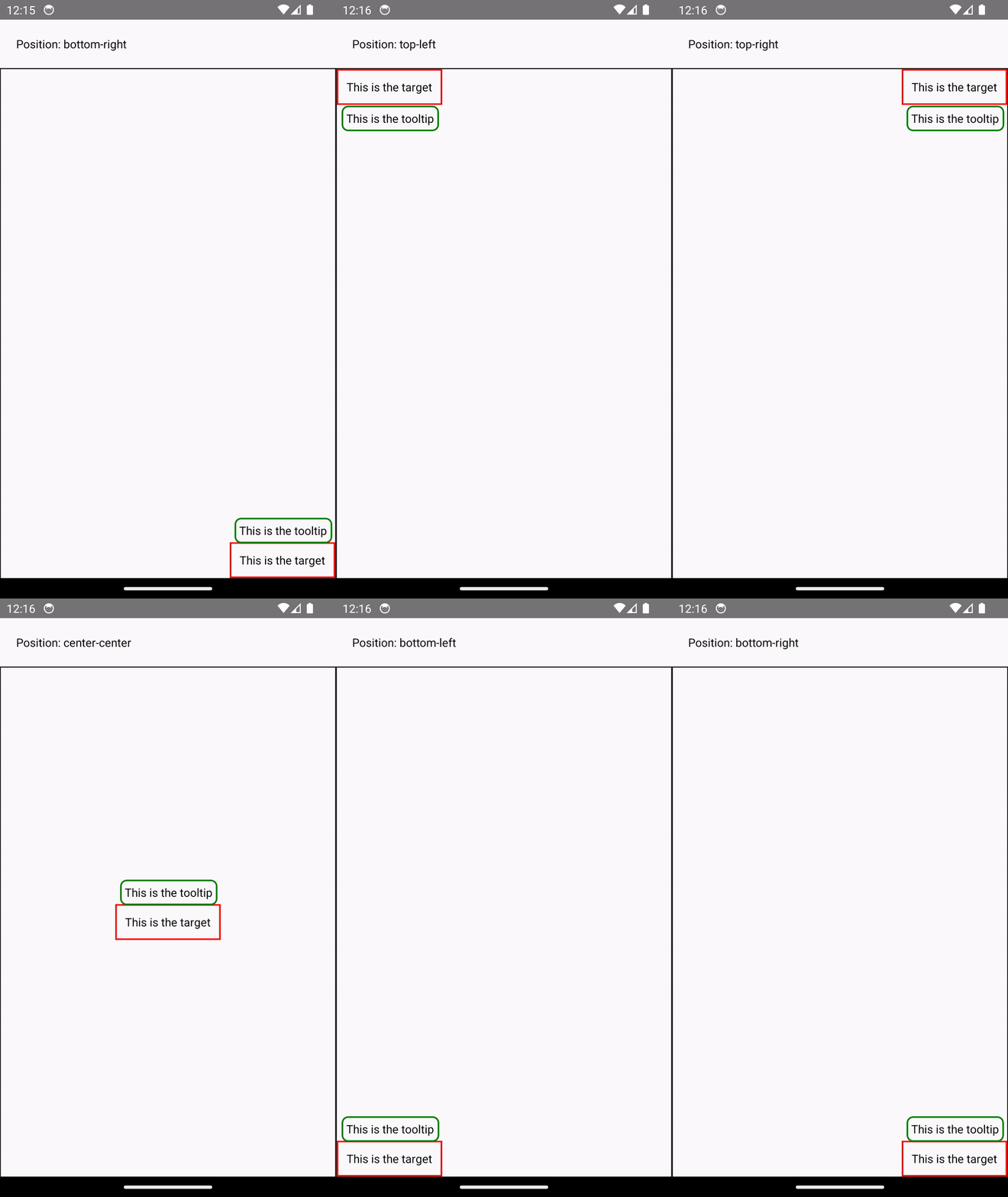
Example: Rendering a Tooltip
Measuring and placing a tooltip above a view allows us to showcase what synchronous rendering unlocks. The tooltip needs to know the position of its target view to determine where it should render.
In the current architecture, we use onLayout to get the measurements of the view and then update the positioning of the tooltip based on where the view is.
function ViewWithTooltip() {
  // ...

  // We get the layout information and pass to Tooltip to position itself
  const onLayout = React.useCallback(event => {
    targetRef.current?.measureInWindow((x, y, width, height) => {
      // This state update is not guaranteed to run in the same commit
      // This results in a visual "jump" as the Tooltip repositions itself
      setTargetRect({x, y, width, height});
    });
  }, []);

  return (
    <>
      <View ref={targetRef} onLayout={onLayout}>
        <Text>Some content that renders a tooltip above</Text>
      </View>
      <Tooltip targetRect={targetRect} />
    </>
  );
}
With the New Architecture, we can use useLayoutEffect to synchronously measure and apply layout updates in a single commit, avoiding the visual "jump".
function ViewWithTooltip() {
  // ...

  useLayoutEffect(() => {
    // The measurement and state update for `targetRect` happens in a single commit
    // allowing Tooltip to position itself without intermediate paints
    targetRef.current?.measureInWindow((x, y, width, height) => {
      setTargetRect({x, y, width, height});
    });
  }, [setTargetRect]);

  return (
    <>
      <View ref={targetRef}>
        <Text>Some content that renders a tooltip above</Text>
      </View>
      <Tooltip targetRect={targetRect} />
    </>
  );
}

Compatibilidad con el renderizador concurrente y sus características
La Nueva Arquitectura admite renderizado concurrente y características incluidas en React 18 y versiones posteriores. Ahora puedes usar funciones como Suspense para carga de datos, Transitions y otras nuevas APIs de React en tu código React Native, unificando más las bases de código y conceptos entre desarrollo web y nativo.
El renderizador concurrente también ofrece mejoras inmediatas como agrupación automática, que reduce re-renderizaciones en React.
Example: Automatic Batching
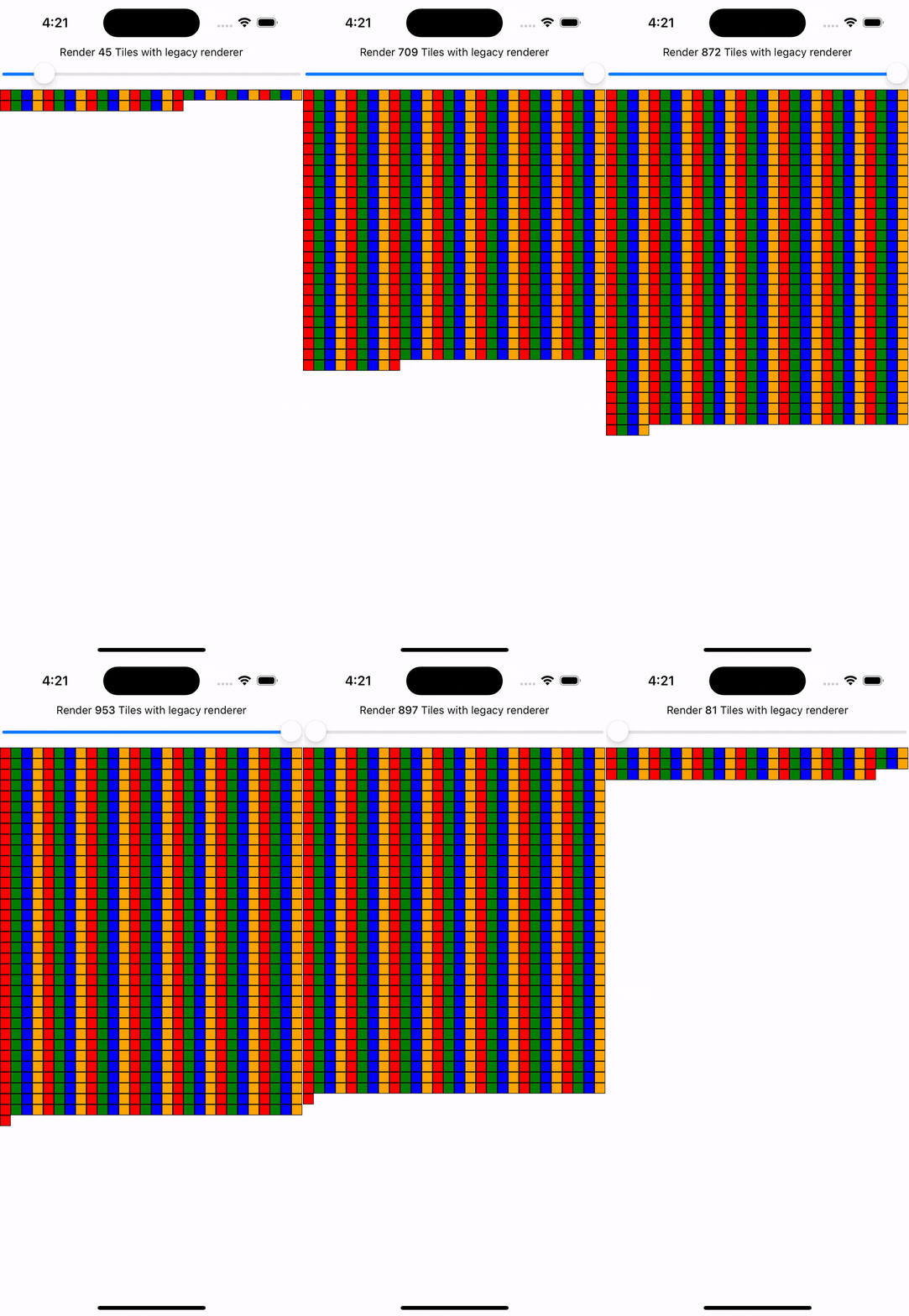
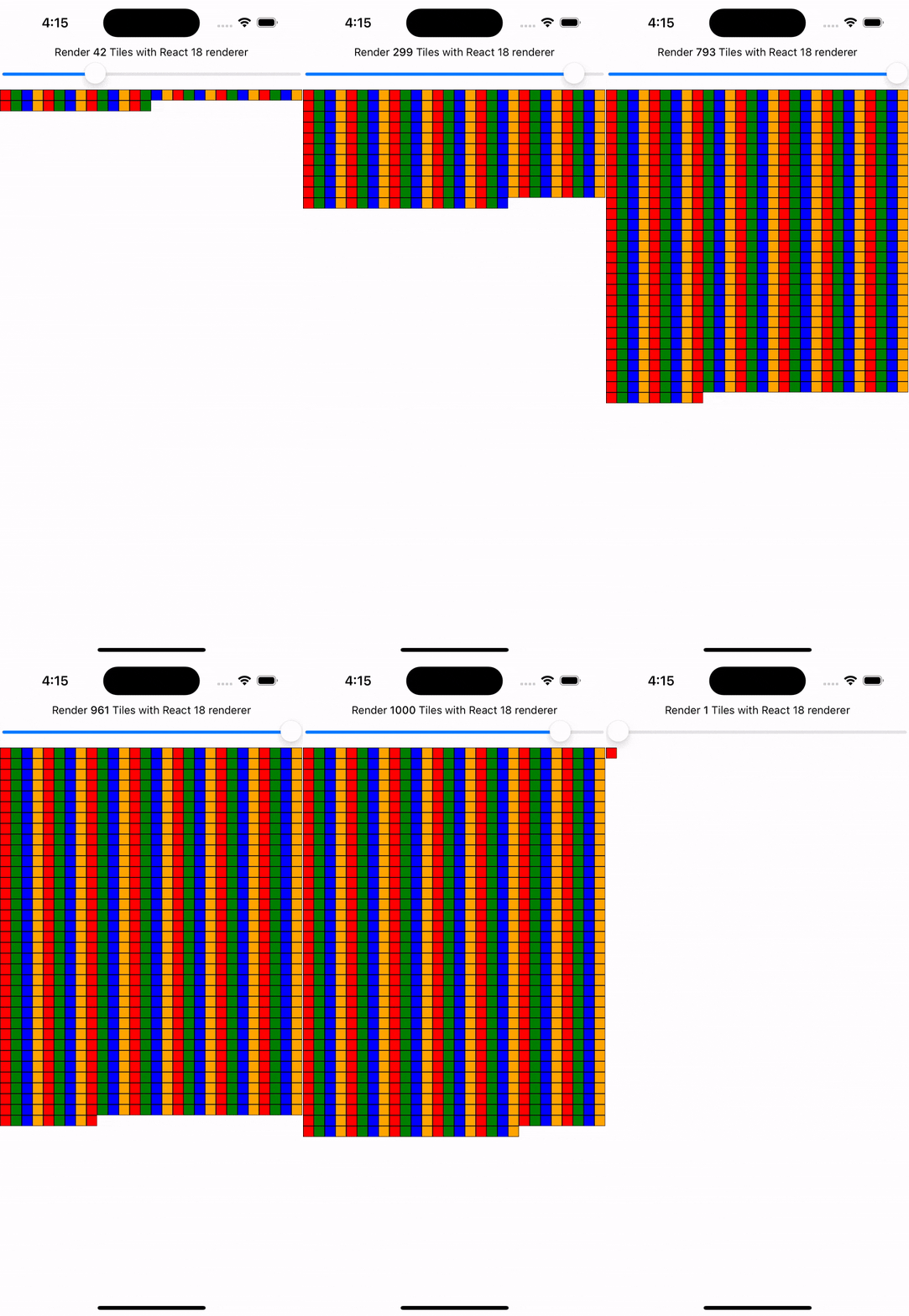
With the New Architecture, you'll get automatic batching with the React 18 renderer.
In this example, a slider specifies how many tiles to render. Dragging the slider from 0 to 1000 will fire off a quick succession of state updates and re-renders.
In comparing the renderers for the same code, you can visually notice the renderer provides a smoother UI, with less intermediate UI updates. State updates from native event handlers, like this native Slider component, are now batched.
Nuevas características concurrentes como Transitions te permiten expresar la prioridad de actualizaciones de UI. Marcar una actualización como de baja prioridad permite a React "interrumpir" su renderizado para manejar actualizaciones de mayor prioridad, garantizando experiencia de usuario fluida donde importa.
Example: Using startTransition
We can build on the previous example to showcase how transitions can interrupt in-progress rendering to handle a newer state update.
We wrap the tile number state update with startTransition to indicate that rendering the tiles can be interrupted. startTransition also provides a isPending flag to tell us when the transition is complete.
function TileSlider({value, onValueChange}) {
  const [isPending, startTransition] = useTransition();

  return (
    <>
      <View>
        <Text>
          Render {value} Tiles
        </Text>
        <ActivityIndicator animating={isPending} />
      </View>
      <Slider
        value={1}
        minimumValue={1}
        maximumValue={1000}
        step={1}
        onValueChange={newValue => {
          startTransition(() => {
            onValueChange(newValue);
          });
        }}
      />
    </>
  );
}

function ManyTiles() {
  const [value, setValue] = useState(1);
  const tiles = generateTileViews(value);
  return (
      <TileSlider onValueChange={setValue} value={value} />
      <View>
        {tiles}
      </View>
  )
}
You'll notice that with the frequent updates in a transition, React renders fewer intermediate states because it bails out of rendering the state as soon as it becomes stale. In comparison, without transitions, more intermediate states are rendered. Both examples still use automatic batching. Still, transitions give even more power to developers to batch in-progress renders.


Interfaz rápida entre JavaScript y nativo
La Nueva Arquitectura reemplaza el puente asíncrono entre JavaScript y nativo con JavaScript Interface (JSI). JSI permite que JavaScript mantenga referencias a objetos C++ y viceversa. Con referencias directas a memoria, puedes invocar métodos sin costos de serialización.
JSI permite que VisionCamera, una popular biblioteca de cámara para React Native, procese fotogramas en tiempo real. Los búferes típicos de ~30 MB equivalen a ~2 GB de datos por segundo según FPS. Comparado con los costos de serialización del puente, JSI maneja estos volúmenes de interfaz fácilmente. JSI puede exponer otros tipos complejos basados en instancias como bases de datos, imágenes o muestras de audio.
La adopción de JSI en la Nueva Arquitectura elimina esta clase de trabajo de serialización en toda interoperabilidad nativo-JavaScript. Esto incluye inicialización y re-renderizado de componentes nativos centrales como View y Text. Puedes leer más sobre nuestra investigación de rendimiento en renderizado en la Nueva Arquitectura y las mejoras de rendimiento medidas.
¿Qué puedo esperar al activar la Nueva Arquitectura?
Aunque la Nueva Arquitectura habilita estas características y mejoras, activarla para tu aplicación o biblioteca podría no mejorar inmediatamente el rendimiento o la experiencia del usuario.
Por ejemplo, tu código podría requerir refactorización para aprovechar capacidades como efectos de diseño síncronos o características concurrentes. Aunque JSI minimizará la sobrecarga entre JavaScript y la memoria nativa, la serialización de datos quizás no era un cuello de botella en el rendimiento de tu aplicación.
Habilitar la Nueva Arquitectura en tu aplicación o biblioteca significa adoptar el futuro de React Native.
El equipo está investigando y desarrollando activamente nuevas capacidades que la Nueva Arquitectura desbloquea. Por ejemplo, la alineación web es un área de exploración activa en Meta que se integrará en el ecosistema de código abierto de React Native.
Puedes seguir y contribuir en nuestro repositorio dedicado de discusiones y propuestas.
¿Debo usar la Nueva Arquitectura hoy?
Desde la versión 0.76, la Nueva Arquitectura está habilitada por defecto en todos los proyectos de React Native.
Si encuentras algún problema, por favor abre un issue usando esta plantilla.
Si por algún motivo no puedes usar la Nueva Arquitectura, aún puedes desactivarla:
Android
-
Abre el archivo
android/gradle.properties -
Cambia la bandera
newArchEnableddetrueafalse
# Use this property to enable support to the new architecture.
# This will allow you to use TurboModules and the Fabric render in
# your application. You should enable this flag either if you want
# to write custom TurboModules/Fabric components OR use libraries that
# are providing them.
-newArchEnabled=true
+newArchEnabled=false
iOS
-
Abre el archivo
ios/Podfile -
Agrega
ENV['RCT_NEW_ARCH_ENABLED'] = '0'en el ámbito principal del Podfile (Podfile de referencia en la plantilla)
+ ENV['RCT_NEW_ARCH_ENABLED'] = '0'
# Resolve react_native_pods.rb with node to allow for hoisting
require Pod::Executable.execute_command('node', ['-p',
  'require.resolve(
- Instala tus dependencias de CocoaPods con el comando:
bundle exec pod install