React Native 0.74 - Yoga 3.0、默认启用Bridgeless新架构及其他更新





本页面由 PageTurner AI 翻译(测试版)。未经项目官方认可。 发现错误? 报告问题 →
今天我们正式发布 React Native 0.74!本次更新包含 Yoga 3.0、新架构下默认启用 Bridgeless 模式、批量化的 onLayout 更新(新架构特性),以及将 Yarn 3 设为新项目的默认包管理器。
我们还移除了部分废弃 API,包括移除 PropTypes 以及对 PushNotificationIOS 的重大变更。在 Android 平台,最低支持版本现已提升至 SDK 23(Android 6.0)。
重点更新
重大变更
重点详解
Yoga 3.0
新版布局行为
React Native 0.74 集成了布局引擎的最新版本 Yoga 3.0。Yoga 3.0 通过提升样式可预测性优化了布局效果,并支持渲染为 Web 环境编写的组件。
React Native 仍会刻意保留某些不准确的布局行为,因为修复这些行为会影响大量实际项目中的组件。在未来的 React Native 版本中,布局一致性将支持更细粒度的配置。
React Native 之前会翻转 在 row-reverse 容器上设置 margin、padding 或 border 时的 left/right(以及 start/end)边距。现在这些属性的行为已与 Web 对齐。此前依赖边距翻转的代码可能需要更新才能正确渲染。
| Style | Before | After |
|---|---|---|
|
|
|


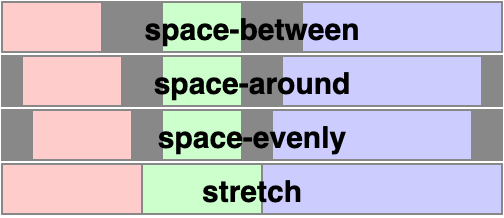
支持 align-content: 'space-evenly'
Yoga 3.0 新增了对 alignContent: 'space-evenly' 的支持。space-evenly 会在多行 flex 容器中均匀分配行间距,使行与容器边缘之间的间距保持相等。
支持 position: 'static'
position: 'static' 仅在新架构中支持
标记为 position: 'static' 的元素无法进行偏移定位,也不会被用作包含块的参照。这允许元素相对于非直接父级的祖先元素进行定位。
|
|

请注意绿色 <View> 设置了 left 和 top 属性后,是相对于蓝色 <View> 而非其直接父容器定位的。
React Native 在未设置 position 时仍默认采用 position: 'relative'。
新架构:默认启用 Bridgeless 模式
此版本中,当启用新架构时,Bridgeless 模式将成为默认选项。您可在此讨论帖了解我们为何将 Bridgeless 设为默认选项。为平滑过渡,我们增强了互操作层对 Bridgeless 的支持,并与多个库合作确保其开箱即用。
除 Bridgeless 外,我们还改进了新渲染器的互操作层:最令人振奋的是现在默认启用——无需手动指定需适配的组件!详情请参阅此文档。
若想深入了解新架构,请查阅 react-native-new-architecture 仓库文档。当新架构成为默认选项时,这些内容将整合至 reactnative.dev。
新架构:批量处理 onLayout 更新
onLayout 回调中的状态更新现已支持批量处理。此前每次 onLayout 事件中的状态更新都会触发新的渲染提交。
function MyComponent(props) {
  const [state1, setState1] = useState(false);
  const [state2, setState2] = useState(false);

  return (
    <View>
      <View
        onLayout={() => {
          setState1(true);
       }}>
      <View
         onLayout={() => {
          // When this event is executed, state1's new value is no longer observable here.
          setState2(true);
        }}>
      </View>
    </View>
  );
}
在 0.74 版本中,setState1 和 setState2 的更新会被批量处理。这一变更符合 React 的预期行为,能够减少不必要的重新渲染次数。
此变更可能破坏依赖非批量状态更新的代码。你需要重构这些代码,使用 更新函数 或等效方案。
新项目的 Yarn 3 支持
Yarn 3 现已成为通过 React Native Community CLI 初始化新项目的默认 JavaScript 包管理器。
Yarn 3.x 将采用 nodeLinker: node-modules 模式,该模式能保持与 React Native 库的兼容性,取代已弃用的 Yarn Classic (1.x) 作为默认选项。升级现有应用的 Yarn 版本请参考此指南。
$ yarn --help
━━━ Yarn Package Manager - 3.6.4 ━━━━━━━━━━━━━━━━━━━━━━━━━━━━━━━━━━━━━━━━━━━━━━━━

  $ yarn <command>
Community CLI 还支持通过 --pm 标志使用其他包管理器初始化项目(了解更多)。
重大变更
Android 最低 SDK 版本提升(Android 6.0)
React Native 0.74 要求最低 Android SDK 版本为 23(Android 6.0)。此前最低支持 Android 5.0(API 21)。变更背景详见讨论。
额外收获:Android 应用体积缩减
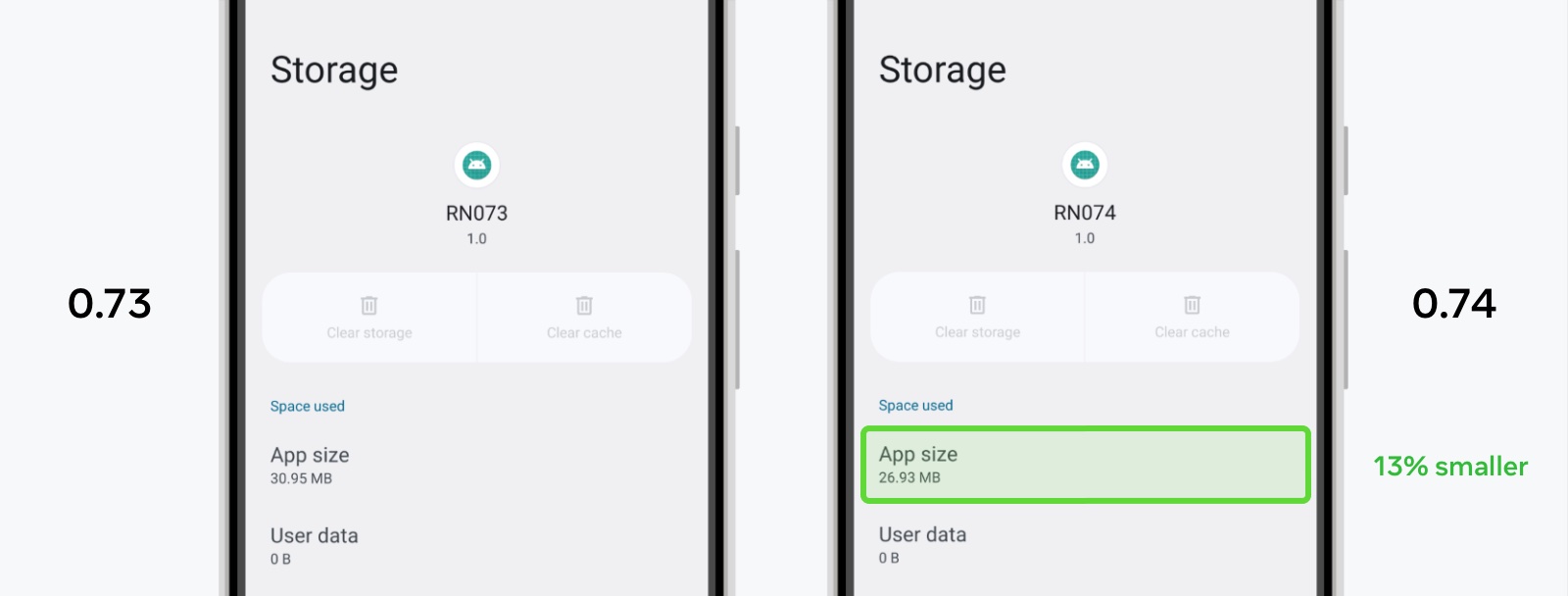
最低 SDK 版本的提升,结合我们在原生构建方面的多项改进,大幅降低了用户设备上的应用体积。
例如,使用 React Native 0.74 新创建的应用在用户设备上占用的空间减少了约 13%,相当于节省约 4MB 存储空间。
移除已弃用的 PropTypes
在 0.74 版本之前,React Native 仍内置了自 2017 年 React 15.5 起已弃用的 PropTypes API。我们现已移除所有内置 PropTypes,从而减少应用体积(压缩包减小 26.4kB)并降低内存开销。
以下 PropTypes 属性已被移除:Image.propTypes, Text.propTypes, TextInput.propTypes, ColorPropType, EdgeInsetsPropType, PointPropType, ViewPropTypes(详见提交记录)。
如果你的应用或库依赖 PropTypes,我们强烈建议迁移到 TypeScript 等类型系统。
PushNotificationIOS(已弃用)的 API 变更
在 React Native 0.74 中,我们开始移除已弃用的 PushNotificationIOS 库。本次变更主要移除了对旧版 iOS API 的引用。PushNotificationIOS 现已迁移至 Apple 的 用户通知 框架,并提供了调度和处理通知的新 API。
在下一版本(0.75)中,我们计划完全移除该库,将其从 React Native 核心迁移至社区包 @react-native-community/push-notification-ios。如果你仍在依赖 PushNotificationIOS,请在下一版本发布前完成迁移。
API 变更
RCTPushNotificationManager 上 didRegisterUserNotificationSettings: 回调已无实际作用,现已被删除。
以下 RCTPushNotificationManager 上的回调函数已被弃用,并将于 0.75 版本中移除:
+ (void)didReceiveLocalNotification:(UILocalNotification *)notification;
+ (void)didReceiveRemoteNotification:(NSDictionary *)notification;
若要通过 getInitialNotification() 获取启动应用的通知,现在需要在 RCTPushNotificationManager 上显式设置 initialNotification:
[RCTPushNotificationManager setInitialNotification:response.notification];
在 JS 端,Notification 的属性已变更。alertAction 和 repeatInterval 现已被弃用,并将于 0.75 版本中移除:
type Notification = {
  ...
  // NEW: Seconds from now to display the notification.
  fireIntervalSeconds?: ?number,

  // CHANGED: Used only for scheduling notifications. Will be null when
  // retrieving notifications using `getScheduledLocalNotifications` or
  // `getDeliveredNotifications`.
  soundName?: ?string,

  // DEPRECATED: This was used for iOS's legacy UILocalNotification.
  alertAction?: ?string,

  // DEPRECATED: Use `fireDate` or `fireIntervalSeconds` instead.
  repeatInterval?: ?string,
};
最后,PushNotificationIOS.removeEventListener 中未使用的 handler 参数已被移除。
💡 How to Migrate
iOS
Your AppDelegate will need to implement UNUserNotificationCenterDelegate. This should be done on app startup in application:willFinishLaunchingWithOptions: or application:didFinishLaunchingWithOptions: (see Apple Docs for more details).
- (BOOL)application:(UIApplication *)application didFinishLaunchingWithOptions:(NSDictionary *)launchOptions
{
  ...
  UNUserNotificationCenter *center = [UNUserNotificationCenter currentNotificationCenter];
  center.delegate = self;

  return YES;
}
Implement userNotificationCenter:willPresentNotification:withCompletionHandler:, which is called when a notification arrives and the app is in the foreground. Use the completionHandler to determine if the notification will be shown to the user and notify RCTPushNotificationManager accordingly:
- (void)userNotificationCenter:(UNUserNotificationCenter *)center
       willPresentNotification:(UNNotification *)notification
         withCompletionHandler:(void (^)(UNNotificationPresentationOptions options))completionHandler
{
  // This will trigger 'notification' and 'localNotification' events on PushNotificationIOS
  [RCTPushNotificationManager didReceiveNotification:notification];
  // Decide if and how the notification will be shown to the user
  completionHandler(UNNotificationPresentationOptionNone);
}
To handle when a notification is tapped, implement userNotificationCenter:didReceiveNotificationResponse:withCompletionHandler:. Note that if you set foreground notifications to be shown in userNotificationCenter:willPresentNotification:withCompletionHandler:, you should only notify RCTPushNotificationManager in one of these callbacks.
If the tapped notification resulted in app launch, call setInitialNotification:. If the notification was not previously handled by userNotificationCenter:willPresentNotification:withCompletionHandler:, call didReceiveNotification: as well:
- (void)  userNotificationCenter:(UNUserNotificationCenter *)center
  didReceiveNotificationResponse:(UNNotificationResponse *)response
           withCompletionHandler:(void (^)(void))completionHandler
{
  // This condition passes if the notification was tapped to launch the app
  if ([response.actionIdentifier isEqualToString:UNNotificationDefaultActionIdentifier]) {
  // Allow the notification to be retrieved on the JS side using getInitialNotification()
    [RCTPushNotificationManager setInitialNotification:response.notification];
  }
 // This will trigger 'notification' and 'localNotification' events on PushNotificationIOS
  [RCTPushNotificationManager didReceiveNotification:response.notification];
  completionHandler();
}
Finally, delete the following methods and adapt the logic into the callbacks above which will be called instead:
application:didReceiveLocalNotification:[deprecated]application:didReceiveRemoteNotification:[deprecated]application:didReceiveRemoteNotification:fetchCompletionHandler:[not deprecated, but is superseded by theUNUserNotificationCenterDelegatemethods]
Delete any usages of application:didRegisterUserNotificationSettings: and RCTPushNotificationManager’s corresponding didRegisterUserNotificationSettings: as well.
Example: See the RNTester AppDelegate.mm.
JS
- Remove any references to
alertAction. - Remove the
handlerargument on any calls toremoveEventListener. - Replace any usages of
repeatIntervalby firing multiple notifications usingfireDateorfireIntervalSecondsinstead. - Note that
soundNamewill be null when it is accessed on aNotificationreturned fromgetScheduledLocalNotifications()andgetDeliveredNotifications().
移除 Flipper React Native 插件
使用 Flipper 检查 React Native 布局、网络请求及其他 React Native 插件功能现已不再受支持。在 0.74 版本中,我们已从新的 React Native 项目中移除原生 Flipper 库和设置代码。这意味着更少的依赖项和更快的本地设置(参见原始 RFC)。
移除 Flipper 的代码差异可在 Upgrade Helper 查看。若需在现有应用中保留 Flipper,请忽略相关差异行。
💡 To re-integrate Flipper
Flipper can still be used as a standalone tool for debugging an Android or iOS app, and can be manually integrated by following the Flipper docs (Android guide, iOS guide).
We recommend that teams invest in switching to native debugging tooling in Android Studio and Xcode.
Flipper 替代方案
有多款专用调试工具可替代 Flipper 的功能。更多信息,我们推荐阅读 Jamon Holmgren 的优质文章《为什么你的 React Native 应用不需要 Flipper》。
JavaScript 调试
使用 Hermes 调试器 仍是我们在 0.74 中的推荐调试方案。您也可尝试实验性新调试器,它也是 Expo 的默认调试器。这仍处于早期预览阶段——已知问题和更新可在此处跟踪。
其他破坏性变更
通用
- 使样式中的
start/end始终指向书写方向(#42251)。
Android
-
从
FabricUIManagerProvider移除JSIModule*(#42059)。- 此 API 在开源项目中未使用——请改用 TurboModules。
-
弃用
UIManagerModule.showPopupMenu和UIManagerModule.dismissPopupMenu(#42441)- 此 API 已移至
@react-native/popup-menu-androidnpm 包,并将于 0.75 版本中移除。
- 此 API 已移至
iOS
-
从 iOS 代码生成 CLI 中删除
configFilename和configKey参数(#41533)。 -
- 此前
bundleURL在 React Native 启动时被设置为实例变量且无法更新 - 现在
bundleUrl改为函数形式,会在需要时重新计算值,支持在不同刷新周期使用不同 URL - 仅当应用启动后需要修改
bundleURL值时会影响现有项目。遇到此情况请将更新逻辑迁移至AppDelegate的bundleURL函数
- 此前
完整破坏性变更清单请查阅 更新日志
已知问题
iOS
- 多窗口场景下的边界情况:当主窗口处于非活动状态时系统尝试显示对话框,可能导致对话框定位异常。修复方案 #44167 将在 0.74.1 版本发布
致谢
React Native 0.74 包含来自 57 位贡献者的 1673 次提交,感谢所有开发者的辛勤付出!
特别感谢为本版本发布文档撰写功能说明的各位作者:
-
Nick Gerleman - Yoga 3.0
-
Joe Vilches - Yoga 3.0
-
Riccardo Cipolleschi - 新架构:默认启用 Bridgeless
-
Samuel Susla - 新架构:批处理
onLayout更新 -
Tim Yung - 移除废弃的
PropTypes -
Ingrid Wang - PushNotificationIOS(已废弃)API 变更
升级到 0.74
请使用 React Native 升级助手 查看现有项目在不同 React Native 版本间的代码变更,并参考 升级文档
要创建新项目:
npx react-native@latest init MyProject
如使用 Expo,React Native 0.74 将在 Expo SDK 51 中提供支持
0.74 现已成为 React Native 最新稳定版本,0.71.x 版本将停止支持。更多信息请参阅 React Native 支持策略。我们计划在五月初发布 0.71 的最终终止支持更新