React Native 0.75 - 布局支持百分比值、新架构稳定性改进、模板与初始化更新等






本页面由 PageTurner AI 翻译(测试版)。未经项目官方认可。 发现错误? 报告问题 →
今天我们很高兴地发布 React Native 0.75!
本次版本带来了多项功能,包括支持 % 值的 Yoga 3.1、新架构的稳定性修复,以及建议开发者使用 React Native 框架的推荐方案。
重点更新
重大变更
重点详解
Yoga 3.1 与布局改进
自从在 React Native 0.74 中发布 Yoga 3.0 以来,我们持续为应用布局能力带来了多项改进。React Native 0.75 搭载了 Yoga 3.1,您可以在 Yoga 的官方发布博客中了解更多新特性。
其中一项备受期待的功能是新增了对 % 百分比值的支持,适用于 gaps(间隙)和 translation(位移)等多种场景。
这些功能仅在新架构中可用。如果您希望使用它们,请考虑迁移至新架构。
间隙属性支持百分比值
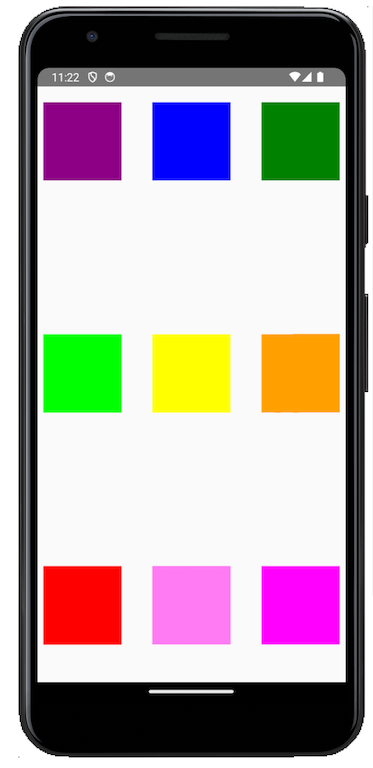
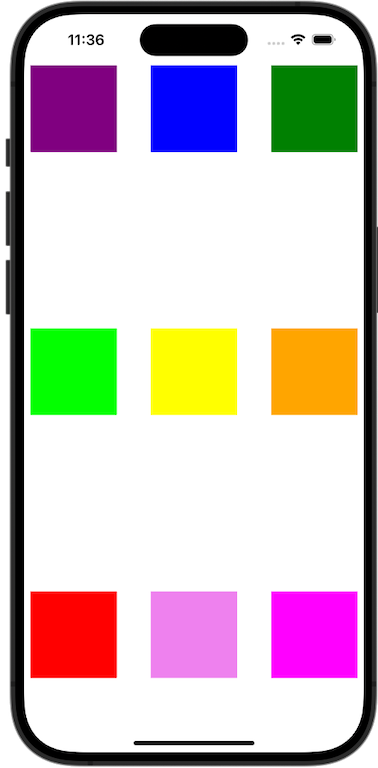
在 0.75 版本中,此处文档描述的 gap、columnGap 和 rowGap 属性现在支持带 % 的字符串值。
例如:
function App(): React.JSX.Element {
  return (
    <SafeAreaView
      style={{
        marginTop: 20,
        alignItems: 'center',
        flex: 1,
        rowGap: '20%',
      }}>
      <View
        style={{flex: 1, flexDirection: 'row', columnGap: '10%'}}>
        <View
          style={{
            backgroundColor: 'purple',
            width: 100,
            height: 100,
          }}
        />
        <View
          style={{
            backgroundColor: 'blue',
            width: 100,
            height: 100,
          }}
        />
        <View
          style={{
            backgroundColor: 'green',
            width: 100,
            height: 100,
          }}
        />
      </View>
      <View
        style={{flex: 1, flexDirection: 'row', columnGap: '10%'}}>
        <View
          style={{
            backgroundColor: 'lime',
            width: 100,
            height: 100,
          }}
        />
        <View
          style={{
            backgroundColor: 'yellow',
            width: 100,
            height: 100,
          }}
        />
        <View
          style={{
            backgroundColor: 'orange',
            width: 100,
            height: 100,
          }}
        />
      </View>
      <View
        style={{flex: 1, flexDirection: 'row', columnGap: '10%'}}>
        <View
          style={{
            backgroundColor: 'red',
            width: 100,
            height: 100,
          }}
        />
        <View
          style={{
            backgroundColor: 'violet',
            width: 100,
            height: 100,
          }}
        />
        <View
          style={{
            backgroundColor: 'magenta',
            width: 100,
            height: 100,
          }}
        />
      </View>
    </SafeAreaView>
  );
}
渲染效果如下:
| Android | iOS |
|---|---|
 |  |
位移变换支持百分比值
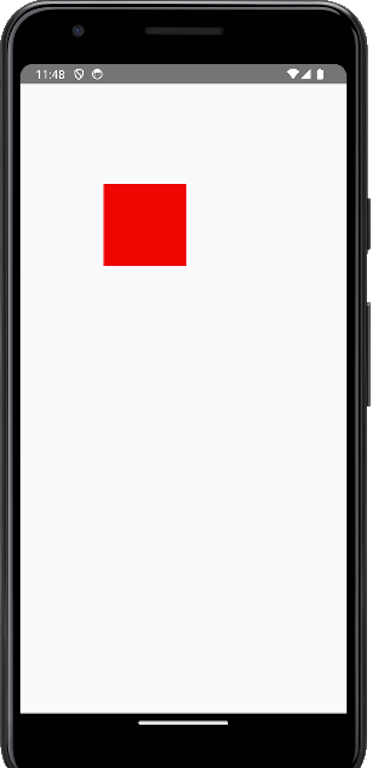
transform 属性现在也可接受 % 作为 translate 变换的数值单位。
例如,以下组件会将红色正方形的 X 坐标移动其宽度的 100%,Y 坐标移动其高度的 100%:
function Translated() {
  return (
    <SafeAreaView
      style={{
        marginTop: 20,
        flex: 1,
        rowGap: '20%',
      }}>
      <View
        style={{
          backgroundColor: 'red',
          width: 100,
          height: 100,
          transform: [{translateY: '100%'}, {translateX: '100%'}],
        }}
      />
    </SafeAreaView>
  );
}
渲染效果如下:
| Android | iOS |
|---|---|
 |  |
新架构的稳定化工作
自我们在 React Conf 上宣布新架构进入 Beta 阶段以来,我们已经发布了多个错误修复和稳定性改进。
我们的目标是在近期将新架构确立为稳定版本。因此,过去几个月我们专注于弥合新旧架构之间的差异。部分修复的错误和缺失功能示例如下:
-
修复 Android 上的
adjustsFontSizeToFit问题 (#44075) -
修复 Android 上
textAlign在行内视图中不生效的问题 (#44146) -
修复 iOS 文本基线偏移问题 (#44932)
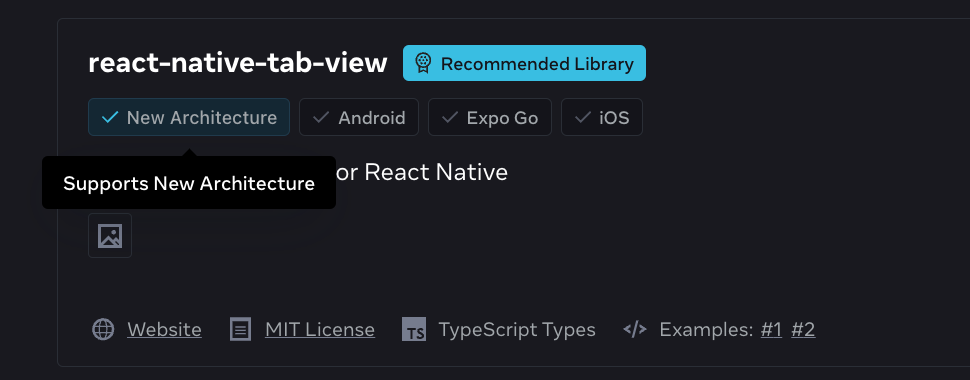
我们与 Expo 团队合作,在 React Native 组件目录中增加了新架构支持信息,让您可以直观了解某个库是否已支持新架构:
诚邀您参与新架构调查,这对我们收集关键反馈以规划新架构的后续步骤至关重要。
我们还在新架构工作组发布了关于在新架构中支持 UIManager的博文,详细介绍了 Android 平台的 UIManager API 及其如何助力高级应用和库的迁移。
此版本还引入了访问 jsi::Runtime 的新标准 API。
在 TurboModules 中访问 jsi::Runtime
过去原生模块从未有推荐方式访问 jsi::Runtime,开发者需要通过非正规手段实现,存在风险。我们在 0.74 版本实验性地提供了安全访问 jsi::Runtime 的 API,现于 0.75 版本正式稳定。
Examples on how to access the jsi::Runtime
On iOS, you can make your Turbo Native Module conform to the protocol RCTTurboModuleWithJSIBindings. You can now implement installJSIBindingsWithRuntime, which will give you thread-safe access to the runtime.
@interface RCTSampleTurbo Module () <RCTTurboModuleWithJSIBindings>
@end

#pragma mark - RCTTurboModuleWithJSIBindings
- (void)installJSIBindingsWithRuntime:(jsi::Runtime &)runtime {
  runtime.global().setProperty(
    runtime,
    "myGlobalFunction",
    jsi:: Function::createFromHost Function(...));
}
On Android, you can make your Turbo Native Module conform to the interface TurboModuleWithBindings. You can now implement the JNI method getBindingsInstaller, which will give you thread-safe access to the runtime in C++.
public class SampleTurboModule extends NativeSampleTurboModuleSpec implements TurboModuleWithJSIBindings

@Override
public native BindingsInstallerHolder getBindingsInstaller();
// C++
jni::local_ref<BindingsInstallerHolder::javaobject> SampleTurboModuleJSIBindings::getBindingsInstaller(jni::alias_ref<jni::object> jobj) {
  return BindingsInstallerHolder::newObjectCxxArgs(
    [](jsi::Runtime& runtime) {
      runtime.global().setProperty(
        runtime,
        “myGlobalFunction”,
        jsi::Function::createFromHostFunction(...));
    }
  );
}
If you’re on the UI thread and you need to access the runtime, we introduced a new API: CallInvoker. It consists of a single method, invokeAsync, that will jump onto the JS thread to safely execute some work using the JS runtime. These APIs are forward compatible.
On iOS, we’ve provided the protocol RCTCallInvokerModule. After conforming to this protocol, our infrastructure will decorate the module with access to the CallInvoker.
@interface RCTSampleTurboModule() <RCTCallInvokerModule>

[self.callInvoker callInvoker].invokeAsync([&](jsi::Runtime& runtime) {
  // do stuff on JS thread
}
On Android, the CallInvoker is accessible through the ReactContext in a JNI wrapper called CallInvokerHolder, where you can then call invokeAsync after crossing the JNI boundary.
// Java
public abstract CallInvokerHolder getJSCallInvokerHolder();
// C++
jsCallInvokerHolder->cthis()->getCallInvoker()->invokeAsync([&](jsi::Runtime& rt) {
  // do stuff on JS thread
});
使用框架开发
正如今年早些时候在 React Conf 所宣布的,现在推荐使用框架(如 Expo)来构建 React Native 应用。
您可以在我们之前的博文中了解更多指导建议:"使用框架构建 React Native 应用"。
我们希望为 React Native 新用户铺就成功之路。相信使用框架能最大化开发效率,并在构建新应用时提供最佳开发者体验。
为落实这些建议,此版本包含以下变更:
-
将
/template文件夹从react-native包迁移至独立仓库:react-native-community/template -
将于 2024 年 12 月 31 日起停止维护
react-native init命令
如果您已在使用 Expo 等框架,这些变更不会有任何影响。您可以将 React Native 0.75 与 Expo SDK 51 配合使用(操作说明详见这篇 Expo 专文)。
若您尚未使用框架或正在自建框架,以下说明将帮助您了解这些变更的影响。
将模板迁移至 react-native-community/template
过去,react-native 在 NPM 包中包含 /template 文件夹,供 Community CLI 用于创建新项目。这使得模板更新变得相当缓慢,因为每次变更都需要发布新的 React Native 版本。
鉴于我们最新推荐使用框架,我们认为在核心 NPM 包中内置固化的模板不符合我们的愿景。
因此,我们决定将模板迁移至 @react-native-community/template 包。
这将使社区更容易维护和发展模板,无需每次变更都依赖 React Native 发布。此外,这使模板更贴近 Community CLI,让每个人都能更方便地将模板作为独立包进行检视和依赖。
对于使用 Community CLI 创建新项目的用户,这一变更完全透明。从现在起,模板相关问题应报告至模板问题跟踪器。所有依赖模板的工具(如 upgrade-helper)均已相应更新,将继续正常工作。
逐步弃用 react-native init
与模板类似,react-native init 命令也进行了调整以符合新的推荐方案。
过去,react-native init 是创建新 React Native 项目的默认命令。但在 2024 年,我们认为该命令无法提供框架级的入门体验。因此我们不再推荐使用它,建议改用像 Expo 这样的框架。
目前您仍可使用 react-native init 通过 Community CLI 和模板创建新项目,但会看到以下警告:

自 2024 年 12 月 31 日起,init 命令将不再创建项目。您必须选择:
-
使用框架(如 Expo),通过专属命令创建项目(例如
npx create-expo-app) -
直接调用 Community CLI:
npx @react-native-community/cli init
请注意,react-native config 及除 init 外的所有命令将继续正常工作。
为提供平滑迁移体验,react-native@0.75.0 仍依赖 @react-native-community/cli,但我们计划在近期移除该依赖。
Auto-linking 性能优化
在更新 init 命令过程中,我们重写了 auto-linking 逻辑以提升性能,这将为 Android 和 iOS 带来更快的构建速度。
在 React Native 0.75 中,使用 Expo 时 auto-linking 步骤在 Android 上的速度可提升约 6.5 倍,iOS 上提升约 1.5 倍。您可在此处阅读优化详情。
重大变更
尽管本节篇幅较长,我们预计这些变更主要影响以高级方式使用 React Native 的小部分用户。
出于完整性和参考目的,我们在此列出。
TypeScript 中的 Touchables 不能再作为泛型表达式中的类型使用
TouchablesOpacity 和 TouchableHighlights 组件已转换为函数式组件,这意味着它们不能再作为 value & type 使用。例如,以下写法不再有效:
import {TouchableHighlight} from 'react-native';
const ref = useRef<TouchableHighlight>();
//                ^^^ TS2749: TouchableHighlight refers to a value, but is being used as a type here.
//                            Did you mean typeof TouchableHighlight?
应改用 React 内置类型 React.ElementRef 或替代方案 View 类型:
import {TouchableHighlight} from 'react-native';
const ref1 =
  useRef<React.ElementRef<typeof TouchableHighlight>>();
// or
const ref2 = useRef<View>();
支持 minSdk 23 和 minIOSVersion 13.4 的最终版本
严格来说这些并非 0.75 版本的破坏性变更,但我们需明确说明:React Native 0.75 将是支持 minSdk 23(Android 6.0)和 minIOSVersion 13.4 的最终版本。
从 React Native 0.76 开始,最低 SDK 版本将升级至 24(Android 7.0),最低 iOS 版本将升级至 15.1。
详细内容请参阅我们的官方公告:Android 版说明 和 iOS 版说明。
Android:JSIModule 已删除
com.facebook.react.bridge.JSIModule(源码)是我们为允许原生模块直接访问 JSI 而临时引入的 API。
该 API 的访问器已在 0.74 版本弃用,经核实开源社区已无实际使用场景,故在 0.75 版本中移除。
建议改用 Turbo Native Modules 作为替代方案。
Android:弹出菜单迁移至独立包
0.74 版本中已将 Android 的 PopUpMenu 迁移至 @react-native 作用域下的独立包。
0.75 版本中我们将移除核心模块残留的方法:
-
UIManagerModule.showPopupMenu() -
UIManagerModule.dismissPopupMenu()
请改用 @react-native/popup-menu-android 包中的 <PopupMenuAndroid /> 组件作为替代方案。
iOS:完成 PushNotificationIOS 弃用工作
0.74 版本中我们已弃用 PushNotificationIOS 模块的部分 API。
0.75 版本中我们删除了这些 API,以迁移弃用旧版通知元数据表示方式。
已删除的 API 包括:
  + (void)didReceiveLocalNotification:(UILocalNotification *)notification;
  + (void)didReceiveRemoteNotification:(NSDictionary *)notification;
请改用 didReceiveNotification:(UNNotification *)notification。
社区 CLI:移除 ram-bundle 和 profile-hermes 命令
我们宣布从社区 CLI 中移除两个重要命令:ram-bundle 和 profile-hermes。
ram-bundle 命令在 React Native 0.59 引入,用于将 bundle 直接加载到内存中运行。该功能现已被默认 JS 引擎 Hermes 取代,不应继续使用 ram-bundle 命令。
profile-hermes 命令曾是一款用于分析 JavaScript 代码 CPU 性能的工具。该工具使用过时的 .cpuprofile 格式,而该格式在最新版 Chrome 中已不再受支持。随着我们不断提升调试工具的质量标准,此类独立命令功能将逐步淘汰。现在您可通过 实验性新调试器 的 "Profiler" 面板进行 CPU 性能分析(注意:通过 Chrome 连接 Hermes 时无法使用此功能)。
其他重大变更
通用变更
-
Codegen
- 微调纯 C++ TurboModules 生成的类和结构体命名:移除了名称中的
Cxx标记 - 因精度问题不再支持浮点枚举(Float enums)
- 在 JS 中向 Native 的非可空参数传递
null时将抛出错误
- 微调纯 C++ TurboModules 生成的类和结构体命名:移除了名称中的
-
代码检查
- ESLint 配置在 lint 时不再运行 Prettier
-
C++
ScrollViewShadowNode构造函数新增bool includeTransform参数- 从 RuntimeExecutor 移除
executeAsynchronously和executeSynchronously_CAN_DEADLOCK方法 - 在
JsErrorHandler.h中将JsErrorHandlingFunc重命名为OnJsError - 在
handleFatalError.h中将handleJsError重命名为OnJsError - 移除
ReactPrimitives.h中未使用的import语句 LongLivedObjectCollection和LongLivedObject的 get 方法现需接收 Runtime 参数- 将
utils/jsi.h文件重命名为jsi-utils.h
-
文本输入组件(TextInput)
- 移除已弃用的
onTextInput回调
- 移除已弃用的
-
按压事件处理(Pressability)
- 移除
onLongPressShouldCancelPress_DEPRECATED、onResponderTerminationRequest_DEPRECATED和onStartShouldSetResponder_DEPRECATED方法
- 移除
Android 平台变更
-
ReactViewBackgroundDrawable
- 已弃用,请改用
CSSBackgroundDrawable,同时移除ReactViewBackgroundDrawable和ColorUtil中的部分 API
- 已弃用,请改用
-
ReactContext
ReactContext和ReactApplicationContext现为抽象类,请改用BridgeReactContext和BridgelessReactContext- 删除
ReactContext.initializeWithInstance(),请改用BridgeReactInstance - 移除
BridgelessReactContext.getJavaScriptContextHolder(),请改用BridgelessCatalystInstance - 移除
ReactContext.getRuntimeExecutor(),请改用BridgelessCatalystInstance
-
布局系统
- 支持百分比 flex 间隙值,导致
setGap、setRowGap和setColumnGap等方法参数从 float 改为 dynamic 类型 - 现需在 Android Manifest 中声明
supportsRTL
- 支持百分比 flex 间隙值,导致
-
运行时
- 从 ReactHostImpl 移除
ReactJsExceptionHandler - 当不使用默认模板时,应用需自行返回核心 turbomodules
- 从 ReactHostImpl 移除
-
开发支持
DevSupportManagerFactory.create()新增PausedInDebuggerOverlayManager参数
-
测量系统
- 删除
UIManagerModule.measureLayoutRelativeToParent()
- 删除
iOS 平台变更
-
运行时
- 移除
[RCTHost getSurfacePresenter]和[RCTHost getModuleRegistry]方法 - 移除
EventPriority类,始终使用默认的EventPriority::AsynchronousBatched,若构建失败请移除所有EventPriority引用
- 移除
-
图片组件
- 移除未使用的
RCTImageLoadingPerfInstrumentationEnabled
- 移除未使用的
-
错误处理
- 移除通过
RCTBridge访问RCTRedBox的功能
- 移除通过
-
CocoaPods
- 将
BUILD_FROM_SOURCE重命名为RCT_BUILD_HERMES_FROM_SOURCE - 将
React-Codegen重命名为ReactCodegen,以提升与use_frameworks和 Swift 的兼容性
- 将
-
TextInput
- 移除已弃用的
onTextInput回调函数
- 移除已弃用的
致谢
React Native 0.75 包含来自 165 位贡献者 的超过 1491 次提交。感谢所有人的辛勤付出!
特别感谢为本版本发布文档撰写功能说明的各位作者:
-
Nick Gerleman 和 Joe Vilches 撰写的《Yoga 3.1 与布局改进》
-
Arushi Kesarwani 在新架构中支持 UIManager
-
Phillip Pan 实现在 TurboModules 中访问 jsi::Runtime
-
Alan Lee 和 Soe Lynn 确认支持 minSdk 23 和 minIOSVersion 13.4 的最终版本
-
Kudo Chien 优化自动链接性能
-
Alex Hunt 移除
ram-bundle和profile-hermes命令
升级到 0.75
对于现有项目,除了升级文档外,请使用 React Native Upgrade Helper 查看 React Native 各版本间的代码变更。
要创建新项目:
npx @react-native-community/cli@latest init MyProject --version latest
若使用 Expo,React Native 0.75 将在 Expo SDK 51 中提供支持(在 Expo 项目中更新 React Native 至 0.75.0 的指南详见此专项说明)。
0.75 现已成为 React Native 的最新稳定版本,0.72.x 系列将停止支持。更多信息请参阅 React Native 支持政策。我们计划在近期发布 0.72 的最终生命周期终止更新。