React Native 0.83 - React 19.2、全新 DevTools 功能、无重大变更




本页面由 PageTurner AI 翻译(测试版)。未经项目官方认可。 发现错误? 报告问题 →
今天我们激动地发布 React Native 0.83!
本次发布包含 React 19.2、React Native DevTools 的重要新功能,并支持 Web Performance 和 Intersection Observer API(Canary 阶段)。这也是首个没有面向用户的重大变更的 React Native 版本。
重点更新
React 19.2
本次发布包含 React 19.2,为 React Native 带来全新的 <Activity> 和 useEffectEvent API。
当前版本中,react-native@0.83.0 依赖 react@19.2.0。你可能已注意到近期曝光的 React 服务端组件严重安全漏洞。
我们强调 React Native 不受此漏洞直接影响,因为它不依赖以下受影响的包:
react-server-dom-webpackreact-server-dom-parcelreact-server-dom-turbopack
但如果你在 monorepo 中使用 React Native 且存在这些包,请立即检查并升级。
我们将在下个补丁版本中将所有 React 依赖更新至 19.2.1。
<Activity>
<Activity> 让你能将应用拆分为可控制和优先级的"活动"。你可以将其作为条件渲染的替代方案,目前支持两种模式:'visible' 和 'hidden'。
-
hidden:隐藏子元素、卸载副作用,并延迟所有更新直到 React 处理完其他任务 -
visible:显示子元素、挂载副作用,并正常处理更新
使用 <Activity mode='hidden'> 隐藏的组件树有个有趣特性:它们会保留状态。因此当重新变为可见时,例如能保持之前的搜索状态和用户选择。
| React 19.1.1 | React 19.2.1 |
|---|---|
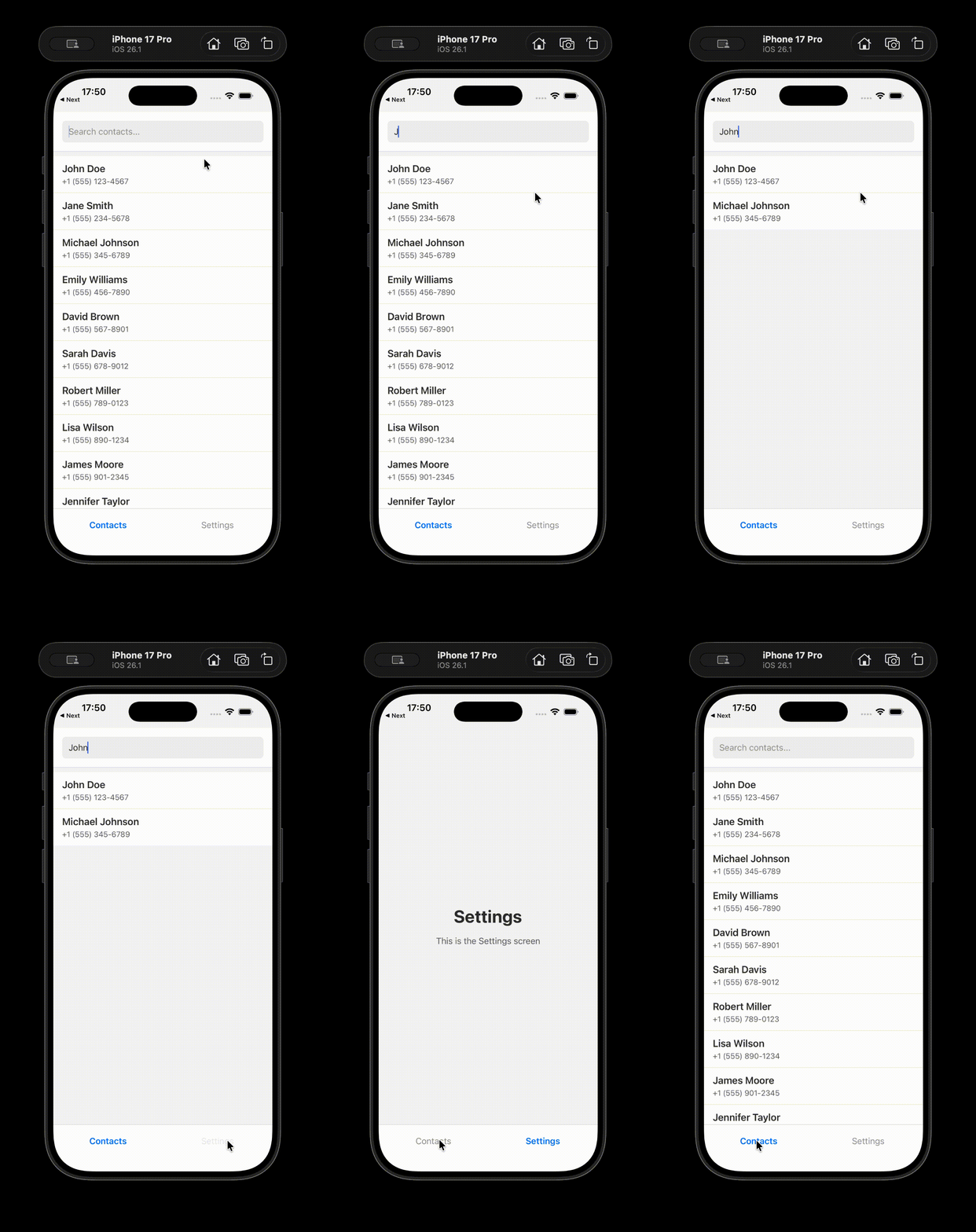 | 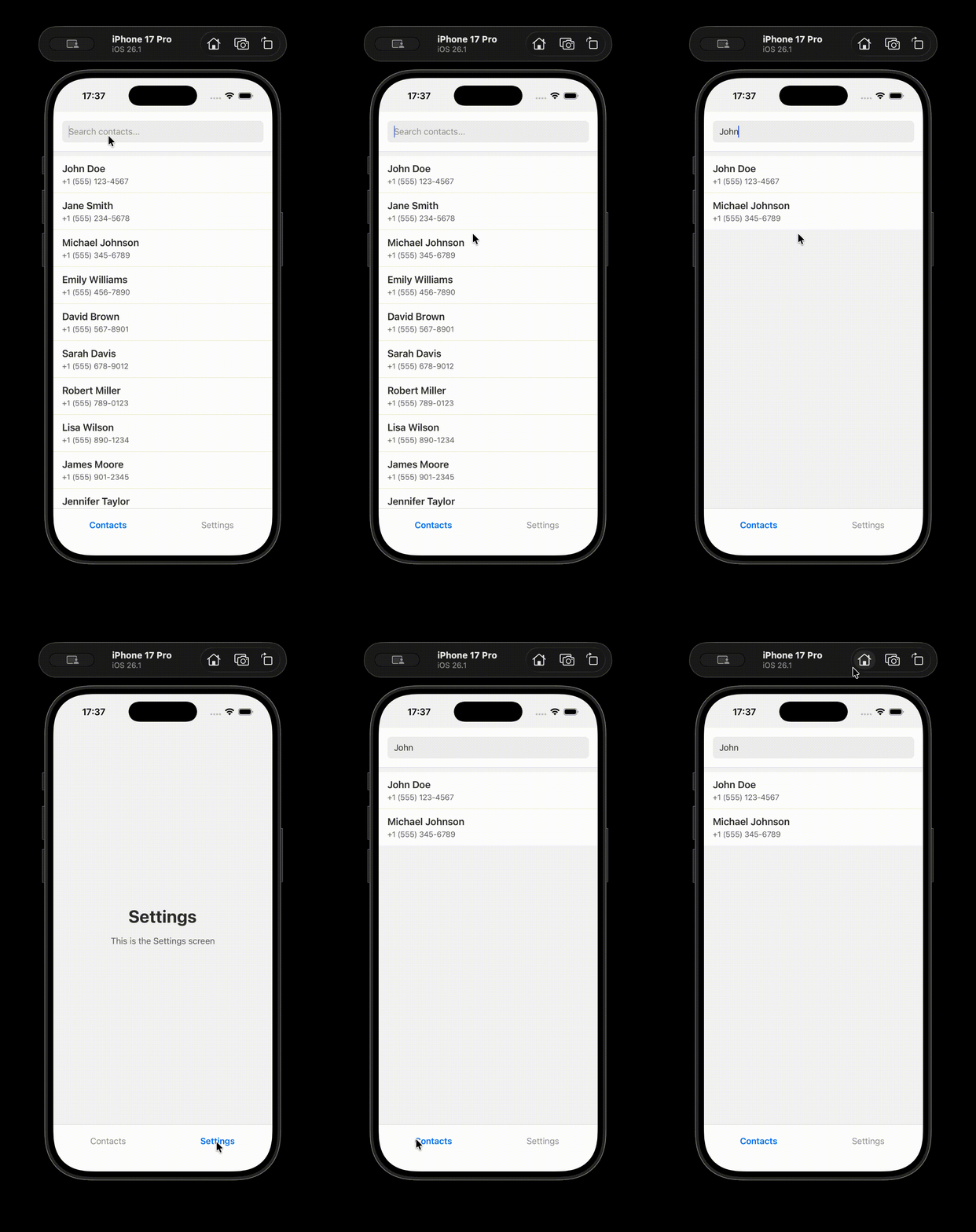 |
你可以在 React 文档 中了解更多关于 <Activity> 的信息。
useEffectEvent
useEffect 的常见模式是通知应用代码外部系统的"事件"。但这种方法的问题是:事件内部使用的任何值发生变化,都会导致外围 Effect 重新执行。
大多数用户会禁用 lint 规则并排除依赖项来解决此问题。但这可能导致错误,因为后续修改 Effect 时,linter 无法再帮你保持依赖项更新。
通过 useEffectEvent,你可以将此逻辑中的"事件"部分从触发它的 Effect 中分离出来。
你可以在 React 文档 中阅读更多关于 useEffectEvent 的内容。
新的 DevTools 功能
在 0.83 版本中,我们很高兴能为 React Native DevTools 带来一些期待已久的功能和体验优化。
网络与性能面板
网络请求检查和性能追踪是 React Native DevTools 中两个强大的新功能,现已可用。
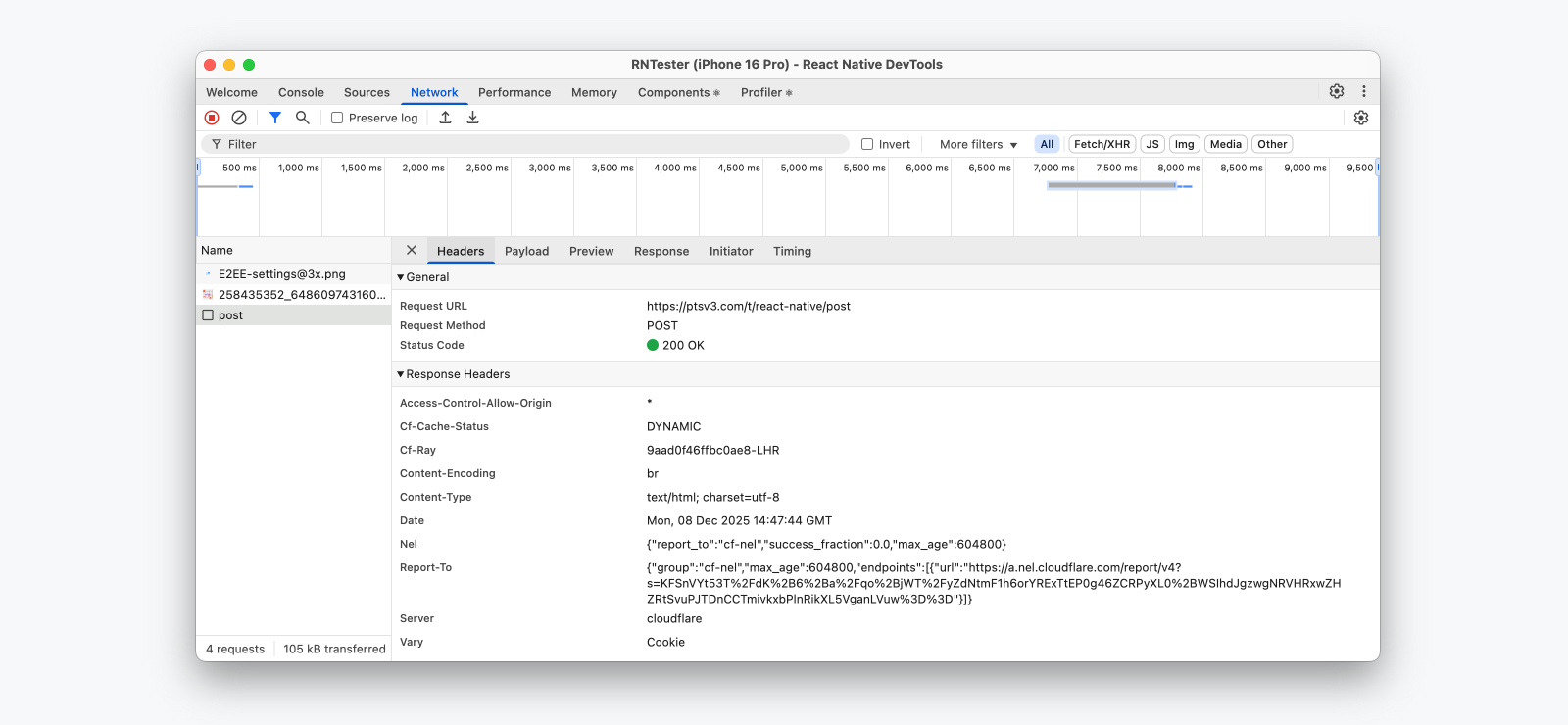
网络请求检查现已适用于所有 React Native 应用,让你可以查看并理解应用发起的网络请求。记录的请求提供了详细的元数据,如时间信息、发送/接收的标头以及响应预览。而且 —— 这是首次 —— 你可以使用 Initiator 标签页查看网络请求在代码中的发起位置。
💡 Network event coverage, Expo support
Which network events are captured?
Today, we record all network calls through fetch(), XMLHttpRequest, and <Image> — with support for custom networking libraries, such as Expo Fetch, coming later.
Expo Network differences
Because of this, apps using Expo will continue to see the "Expo Network" panel — a separate implementation by the Expo framework which will log these additional request sources but has slightly reduced features.
- Coverage for Expo-specific network events.
- No request initiator support.
- No Performance panel integration.
We're working with Expo to integrate Expo Fetch and third party networking libraries with our new Network inspection pipeline in future releases.
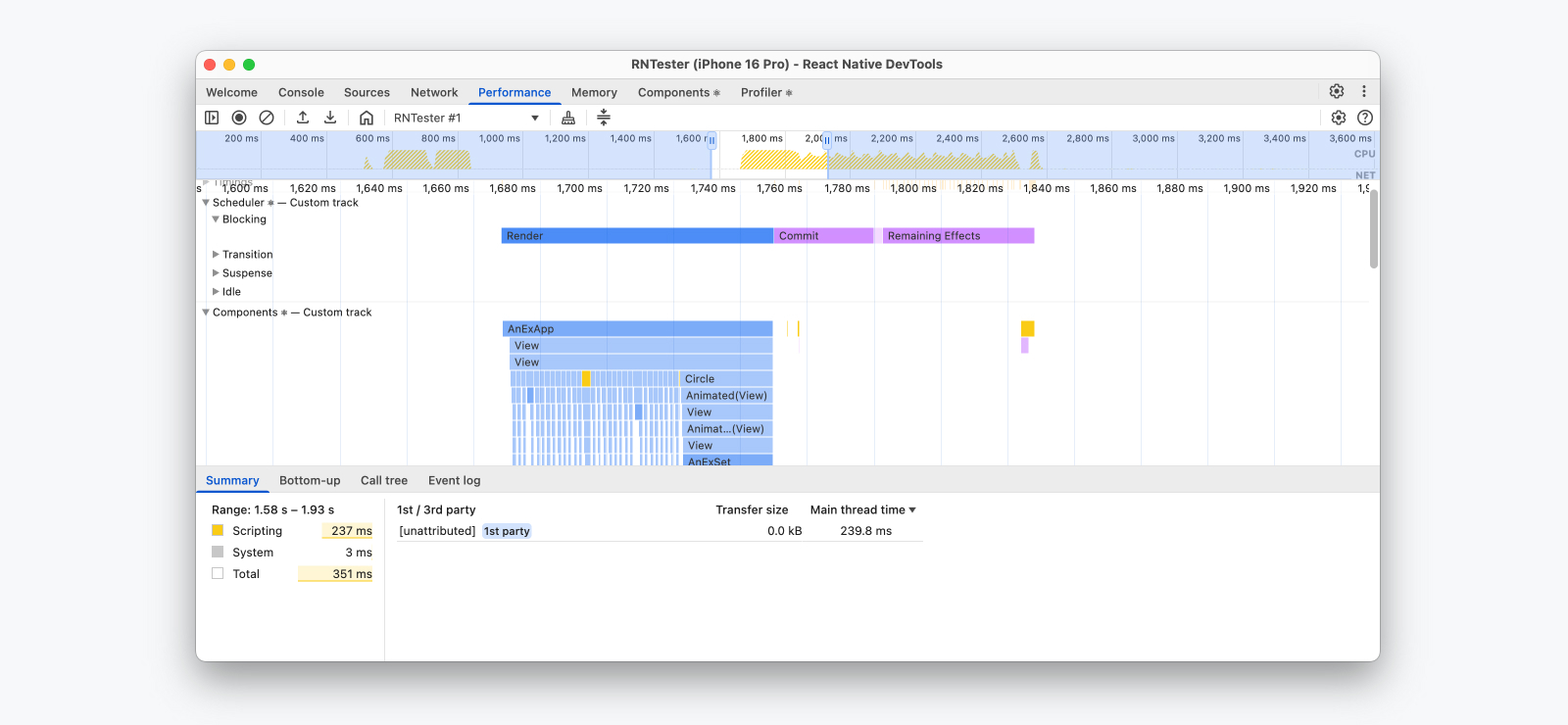
性能追踪功能允许你在应用内录制性能会话,以了解 JavaScript 代码的运行情况以及哪些操作耗时最多。在 React Native 中,我们会将 JavaScript 执行、React 性能追踪、网络事件以及自定义的用户计时呈现在单一的性能时间轴上。
结合 0.83 版本中对 Web Performance API 的支持,这一系列强大功能提供了细粒度的可视化能力,帮助你定位 React Native 应用可能变慢的原因。我们鼓励每个人都尝试使用性能面板,并将其纳入日常工作流。
了解更多关于我们最新的 React Native DevTools 功能 和 React 性能追踪。
全新的桌面应用
此前,React Native DevTools 在浏览器窗口中启动,并要求安装 Chrome 或 Edge。今天,我们推出了全新的桌面应用,带来了大幅改进的桌面体验,其特点包括:
-
与之前相同的零安装设置,现在无需安装浏览器
-
更快的启动速度,通过轻量级且经过公证的桌面二进制文件实现。在极少数无法下载该文件的情况下(例如企业防火墙),我们会回退到之前的浏览器启动流程
-
更优的窗口管理,包括改进的 macOS 多任务处理、断点处自动置顶、重新连接同一应用时自动置顶,以及重新启动时保存的窗口布局
-
更高的可靠性,通过将 DevTools 与个人浏览器配置文件分离运行来实现。特别是,这解决了我们收到的某些预装 Chrome 扩展导致 React Native DevTools 崩溃的错误报告

Intersection Observer(金丝雀版)
作为将 Web API 引入 React Native 的一部分,我们在 0.83 的金丝雀版本中添加了对 IntersectionObserver 的支持。
IntersectionObserver 允许你异步观察目标元素与其祖先元素之间的布局交叉情况。更多详情请参阅我们的 API 文档 和 实现文档。我们还在 RNTester 中提供了示例。
其他变更
Web Performance API 转为稳定版
正如在 0.82 版本引入的,React Native 现已实现 Web 性能 API 的子集——现已作为稳定功能推出:
-
高精度时间:定义
performance.now()和performance.timeOrigin -
性能时间线:定义
PerformanceObserver及访问性能条目方法(getEntries(),getEntriesByType(),getEntriesByName()) -
用户计时:定义
performance.mark和performance.measure -
事件计时 API:定义向
PerformanceObserver报告的event条目类型 -
长任务 API:定义向
PerformanceObserver报告的longtask条目类型
这些 API 可用于追踪应用的各项性能指标,既能在 React Native DevTools 的 Performance 面板查看,也能通过 PerformanceObserver 在运行时获取
PerformanceObserver 在生产构建中同样可用,这为在真实场景中采集应用性能指标开辟了新途径
实验性功能 - Hermes V1

Hermes V1 是 Hermes 引擎的下一代版本,其编译器和虚拟机的改进显著提升了 JavaScript 性能
在 React Native 0.82 中,我们以实验性功能形式推出了 Hermes V1。而在 0.83 版本中,Hermes V1 包含了进一步的性能优化
💡 Enabling Hermes V1
Note: While Hermes V1 is in the experimental phase, you’ll need to build React Native from source to try it out.
To try Hermes V1 in your own project, use the following steps:
- Force your package manager to resolve the experimental version of Hermes V1 compiler package by modifying the corresponding section of your package.json file (note that the current versioning convention is only for the experimental phase of Hermes V1):
- yarn
- npm
"resolutions": { "hermes-compiler": "250829098.0.4" }
"overrides": { "hermes-compiler": "250829098.0.4" }
-
Enable Hermes V1 for Android by adding hermesV1Enabled=true inside
android/gradle.properties:android/gradle.propertieshermesV1Enabled=trueAlso, configure React Native to build from source by editing android/settings.gradle:
android/settings.gradleincludeBuild('../node_modules/react-native') {
dependencySubstitution {
substitute(module("com.facebook.react:react-android")).using(project(":packages:react-native:ReactAndroid"))
substitute(module("com.facebook.react:react-native")).using(project(":packages:react-native:ReactAndroid"))
substitute(project(":packages:react-native:ReactAndroid:hermes-engine")).using(module("com.facebook.hermes:hermes-android:250829098.0.1"))
}
} -
Enable Hermes V1 for iOS by installing pods with
RCT_HERMES_V1_ENABLED=1environment variable.RCT_HERMES_V1_ENABLED=1 bundle exec pod installKeep in mind that Hermes V1 is not compatible with the precompiled React Native builds, so make sure you don’t use the
RCT_USE_PREBUILT_RNCOREflag when installing pods. -
To confirm if your app is running Hermes V1, execute the following code within your app or the DevTools console. This code will return the Hermes version, which should match the version specified in step 1 (250829098.0.1):
// expecting "250829098.0.1" in Hermes V1
HermesInternal.getRuntimeProperties()['OSS Release Version'];
实验性功能 - iOS 平台移除旧架构代码
本次更新为 iOS 平台新增了一个编译标志,允许从代码库中移除旧架构相关代码。如果你的应用已采用新架构,可通过在安装 pods 时使用以下命令来尝试移除旧架构代码:
RCT_REMOVE_LEGACY_ARCH=1 bundle exec pod install
这将同时减少构建时间和应用体积。具体优化效果取决于使用的第三方库数量:在我们的测试中,新建无依赖应用构建时间从 73.0 秒降至 58.2 秒,应用体积从 51.2 MB 缩减至 48.2 MB
RCT_REMOVE_LEGACY_ARCH 与 React Native 预编译二进制文件不兼容。若使用预编译二进制文件,需重新安装 pods 并从源码构建应用
实验性功能 - 调试 iOS 预编译二进制文件
本次更新实现了对预编译二进制文件中 React Native 代码的调试能力,主要适用于库维护者或开发原生模块/组件的场景
要调试随 React Native 预编译二进制文件一起发布的二进制代码,请按照以下步骤操作:
# From the ios folder of your project
bundle exec pod cache clean --all
bundle exec pod deintegrate
RCT_USE_RN_DEP=1 RCT_USE_PREBUILT_RNCORE=1
RCT_SYMBOLICATE_PREBUILT_FRAMEWORKS=1 bundle exec pod install
open <your-project>.xcworkspace
其原理是通过 RCT_SYMBOLICATE_PREBUILT_FRAMEWORKS 标志指示 CocoaPods 下载 React Native dSYM 文件并解压到指定目录
此时可在应用中设置断点(例如在 AppDelegate.swift 中),然后通过 Xcode 构建并运行应用
当应用暂停执行时,打开 Xcode 控制台并运行 LLDB 命令:
# If you are running the app in the simulator
add-dsym <path-to-your-app>/ios/Pods/React-Core-prebuilt/React.xcframework/ios-arm64_x86_64-simulator/React.framework/dSYMs/React.framework.dSYM

# If you are running the app on a physical device
add-dsym <path-to-your-app>/ios/Pods/React-Core-prebuilt/React.xcframework/ios-arm64/React.framework/dSYMs/React.framework.dSYM
现在即可单步进入 React Native 代码进行调试
重大变更
我们正全力提升 React Native 版本发布的可靠性和升级便捷性。React Native 0.83 是首个无用户侧破坏性变更的版本
若你当前使用 React Native 0.82,无需修改应用代码即可升级至 0.83 版本
要了解我们如何定义重大变更,请参阅 这篇文章。
弃用项
本版本包含两项特定于 Android 的弃用:
-
Networking:
sendRequestInternal方法正在逐步淘汰,现已被弃用。 -
Animation:
startOperationBatch和finishOperationBatch现已被弃用。
致谢
React Native 0.83 包含了来自 56 位贡献者的超过 594 次提交。感谢大家的辛勤付出!
特别鸣谢在本版本中做出重大贡献的社区成员:
-
Ruslan Lesiutin、Moti Zilberman 和 Alex Hunt 实现了 React Native DevTools 的性能和网络功能。
-
Moti Zilberman 开发了 React Native DevTools 桌面应用。
-
Luna Wei 实现了 Intersection Observers。
-
Rubén Norte 实现了 Web Performance APIs。
-
Dawid Małecki 和 Jakub Piasecki 推动了 Hermes V1 的落地。
-
Ramanpreet Nara 贡献了
RCT_REMOVE_LEGACY_ARCH标志。 -
Christian Falch 实现了预编译 iOS 二进制文件的调试。
升级到 0.83
请使用 React Native 升级助手 查看现有项目在不同 React Native 版本间的代码变更,并参考 升级文档
要创建新项目:
npx @react-native-community/cli@latest init MyProject --version latest
如果你使用 Expo,React Native 0.83 将在 SDK 55 中提供,该版本将于 2026 年 1 月发布。
支持的版本
0.83 现在是 React Native 的最新稳定版本,而 0.80.x 版本将不再受支持。更多信息请参阅 React Native 支持政策。