本页面由 PageTurner AI 翻译(测试版)。未经项目官方认可。 发现错误? 报告问题 →
跨平台原生模块(C++)
使用 C++ 编写模块是在 Android 和 iOS 之间共享平台无关代码的最佳方式。纯 C++ 模块允许您只编写一次逻辑,就能在所有平台上直接复用,无需编写平台特定代码。
本指南将逐步创建一个纯 C++ Turbo Native 模块:
-
创建 JS 规范文件
-
配置 Codegen 生成脚手架代码
-
实现原生逻辑
-
在 Android 和 iOS 应用中注册模块
-
在 JS 中测试修改
本指南剩余部分假设你已通过以下命令创建应用:
npx @react-native-community/cli@latest init SampleApp --version 0.78
1. 创建 JS 规范文件
纯 C++ Turbo Native 模块本质上是 Turbo Native 模块。它们需要一个规范文件(也称为 spec 文件),以便 Codegen 能为我们生成脚手架代码。该规范文件也是我们在 JS 中访问 Turbo Native 模块的接口。
规范文件需要使用类型化的 JS 方言编写。React Native 当前支持 Flow 或 TypeScript。
-
在应用根目录创建名为
specs的文件夹 -
创建新文件
NativeSampleModule.ts,内容如下:
所有 Native Turbo 模块规范文件必须以 Native 前缀开头,否则 Codegen 将忽略它们
- TypeScript
- Flow
// @flow
import type {TurboModule} from 'react-native'
import { TurboModuleRegistry } from "react-native";

export interface Spec extends TurboModule {
  +reverseString: (input: string) => string;
}

export default (TurboModuleRegistry.getEnforcing<Spec>(
  "NativeSampleModule"
): Spec);
import {TurboModule, TurboModuleRegistry} from 'react-native';

export interface Spec extends TurboModule {
  readonly reverseString: (input: string) => string;
}

export default TurboModuleRegistry.getEnforcing<Spec>(
  'NativeSampleModule',
);
2. 配置 Codegen
下一步是在 package.json 中配置 Codegen。更新文件内容:
     "start": "react-native start",
     "test": "jest"
   },
   "codegenConfig": {
     "name": "AppSpecs",
     "type": "modules",
     "jsSrcsDir": "specs",
     "android": {
       "javaPackageName": "com.sampleapp.specs"
     }
   },
   "dependencies": {
此配置指示 Codegen 在 specs 文件夹中查找规范文件,并指定 Codegen 仅生成 modules 相关代码,同时将生成的代码命名空间设为 AppSpecs。
3. 编写原生代码
编写 C++ Turbo Native 模块可实现在 Android 和 iOS 之间共享代码。因此我们只需编写一次代码,然后研究如何调整平台配置以接入 C++ 代码。
-
在
android和ios文件夹同级位置创建名为shared的文件夹 -
在
shared文件夹中创建新文件NativeSampleModule.h:shared/NativeSampleModule.h#pragma once
#include <AppSpecsJSI.h>
#include <memory>
#include <string>
namespace facebook::react {
class NativeSampleModule : public NativeSampleModuleCxxSpec<NativeSampleModule> {
public:
NativeSampleModule(std::shared_ptr<CallInvoker> jsInvoker);
std::string reverseString(jsi::Runtime& rt, std::string input);
};
} // namespace facebook::react -
在
shared文件夹中创建新文件NativeSampleModule.cpp:shared/NativeSampleModule.cpp#include "NativeSampleModule.h"
namespace facebook::react {
NativeSampleModule::NativeSampleModule(std::shared_ptr<CallInvoker> jsInvoker)
: NativeSampleModuleCxxSpec(std::move(jsInvoker)) {}
std::string NativeSampleModule::reverseString(jsi::Runtime& rt, std::string input) {
return std::string(input.rbegin(), input.rend());
}
} // namespace facebook::react
现在分析我们创建的两个文件:
-
NativeSampleModule.h是纯 C++ TurboModule 的头文件。其中的include语句确保我们引入 Codegen 生成的规范(包含需要实现的接口和基类) -
该模块位于
facebook::react命名空间中,以便访问该命名空间中的所有类型。 -
NativeSampleModule类是实现 Turbo 原生模块的实际类,它继承自NativeSampleModuleCxxSpec类,后者包含粘合代码和样板代码,使此类能够作为 Turbo 原生模块运行。 -
最后是构造函数,它接收指向
CallInvoker的指针用于与 JS 通信(如需要),以及我们需要实现的函数原型。
NativeSampleModule.cpp 文件是我们 Turbo 原生模块的实际实现,它实现了我们在规范中声明的构造函数和方法。
4. 在平台中注册模块
接下来的步骤将让我们在平台中注册该模块。这一步将原生代码暴露给 JS,使 React Native 应用最终能从 JS 层调用原生方法。
这是唯一需要我们编写平台特定代码的步骤。
Android 相关
为确保 Android 应用能正确构建 C++ Turbo 原生模块,我们需要:
-
创建
CMakeLists.txt访问我们的 C++ 代码 -
修改
build.gradle指向新创建的CMakeLists.txt文件 -
在 Android 应用中创建
OnLoad.cpp文件注册新的 Turbo 原生模块
1. 创建 CMakeLists.txt 文件
Android 使用 CMake 进行构建。CMake 需要访问我们在共享文件夹中定义的文件才能构建它们。
-
创建新文件夹
SampleApp/android/app/src/main/jni。jni文件夹是 Android 中 C++ 代码的存放位置。 -
创建
CMakeLists.txt文件并添加以下内容:
cmake_minimum_required(VERSION 3.13)

# Define the library name here.
project(appmodules)

# This file includes all the necessary to let you build your React Native application
include(${REACT_ANDROID_DIR}/cmake-utils/ReactNative-application.cmake)

# Define where the additional source code lives. We need to crawl back the jni, main, src, app, android folders
target_sources(${CMAKE_PROJECT_NAME} PRIVATE ../../../../../shared/NativeSampleModule.cpp)

# Define where CMake can find the additional header files. We need to crawl back the jni, main, src, app, android folders
target_include_directories(${CMAKE_PROJECT_NAME} PUBLIC ../../../../../shared)
该 CMake 文件执行以下操作:
-
定义
appmodules库,所有应用 C++ 代码都将包含在此库中 -
加载基础的 React Native CMake 文件
-
通过
target_sources指令添加需要构建的模块 C++ 源代码。默认 React Native 会填充默认源码到appmodules库,这里我们添加自定义模块。注意我们需要从jni文件夹回溯到存放 C++ Turbo 模块的shared文件夹 -
指定 CMake 查找模块头文件的位置。同样需要从
jni文件夹回溯
2. 修改 build.gradle 包含自定义 C++ 代码
Gradle 是协调 Android 构建的工具。我们需要告知它在哪里查找构建 Turbo 原生模块的 CMake 文件。
-
打开
SampleApp/android/app/build.gradle文件 -
在现有
android块内的 Gradle 文件中添加以下代码块:
    buildTypes {
        debug {
            signingConfig signingConfigs.debug
        }
        release {
            // Caution! In production, you need to generate your own keystore file.
            // see https://reactnative.dev/docs/signed-apk-android.
            signingConfig signingConfigs.debug
            minifyEnabled enableProguardInReleaseBuilds
            proguardFiles getDefaultProguardFile("proguard-android.txt"), "proguard-rules.pro"
        }
    }

+   externalNativeBuild {
+       cmake {
+           path "src/main/jni/CMakeLists.txt"
+       }
+   }
}
此代码块告诉 Gradle 文件查找 CMake 文件的位置。路径相对于 build.gradle 文件所在文件夹,因此我们需要添加指向 jni 文件夹中 CMakeLists.txt 的路径。
3. 注册新的 Turbo 原生模块
最后一步是在运行时注册新的 C++ Turbo 原生模块,这样当 JS 请求该模块时,应用知道在哪里查找并返回它。
- 在
SampleApp/android/app/src/main/jni文件夹中运行以下命令:
curl -O https://raw.githubusercontent.com/facebook/react-native/v0.78.0/packages/react-native/ReactAndroid/cmake-utils/default-app-setup/OnLoad.cpp
- 然后按如下方式修改该文件:
#include <DefaultComponentsRegistry.h>
#include <DefaultTurboModuleManagerDelegate.h>
#include <autolinking.h>
#include <fbjni/fbjni.h>
#include <react/renderer/componentregistry/ComponentDescriptorProviderRegistry.h>
#include <rncore.h>

+ // Include the NativeSampleModule header
+ #include <NativeSampleModule.h>

//...

std::shared_ptr<TurboModule> cxxModuleProvider(
    const std::string& name,
    const std::shared_ptr<CallInvoker>& jsInvoker) {
  // Here you can provide your CXX Turbo Modules coming from
  // either your application or from external libraries. The approach to follow
  // is similar to the following (for a module called `NativeCxxModuleExample`):
  //
  // if (name == NativeCxxModuleExample::kModuleName) {
  //   return std::make_shared<NativeCxxModuleExample>(jsInvoker);
  // }

+  // This code registers the module so that when the JS side asks for it, the app can return it
+  if (name == NativeSampleModule::kModuleName) {
+    return std::make_shared<NativeSampleModule>(jsInvoker);
+  }

  // And we fallback to the CXX module providers autolinked
  return autolinking_cxxModuleProvider(name, jsInvoker);
}

// leave the rest of the file
这些步骤会下载 React Native 的原始 OnLoad.cpp 文件,以便安全覆盖该文件,在应用中加载 C++ Turbo Native Module。
下载文件后,可通过以下方式修改:
-
包含指向我们模块的头文件
-
注册 Turbo Native Module,当 JavaScript 需要时应用可正确返回
现在,你可以在项目根目录运行 yarn android 查看应用是否成功构建。
iOS 相关
为确保 iOS 应用能正确构建 C++ Turbo Native Module,我们需要:
-
安装 pods 并运行 Codegen
-
将
shared文件夹添加到 iOS 项目 -
在应用中注册 C++ Turbo Native Module
1. 安装 Pods 并运行 Codegen
首先执行常规的 iOS 应用准备工作。CocoaPods 是我们设置和安装 React Native 依赖的工具,在此过程中它会自动运行 Codegen。
cd ios
bundle install
bundle exec pod install
2. 将 shared 文件夹添加到 iOS 项目
此步骤使 shared 文件夹在 Xcode 中可见。
- 打开 CocoaPods 生成的 Xcode Workspace。
cd ios
open SampleApp.xcworkspace
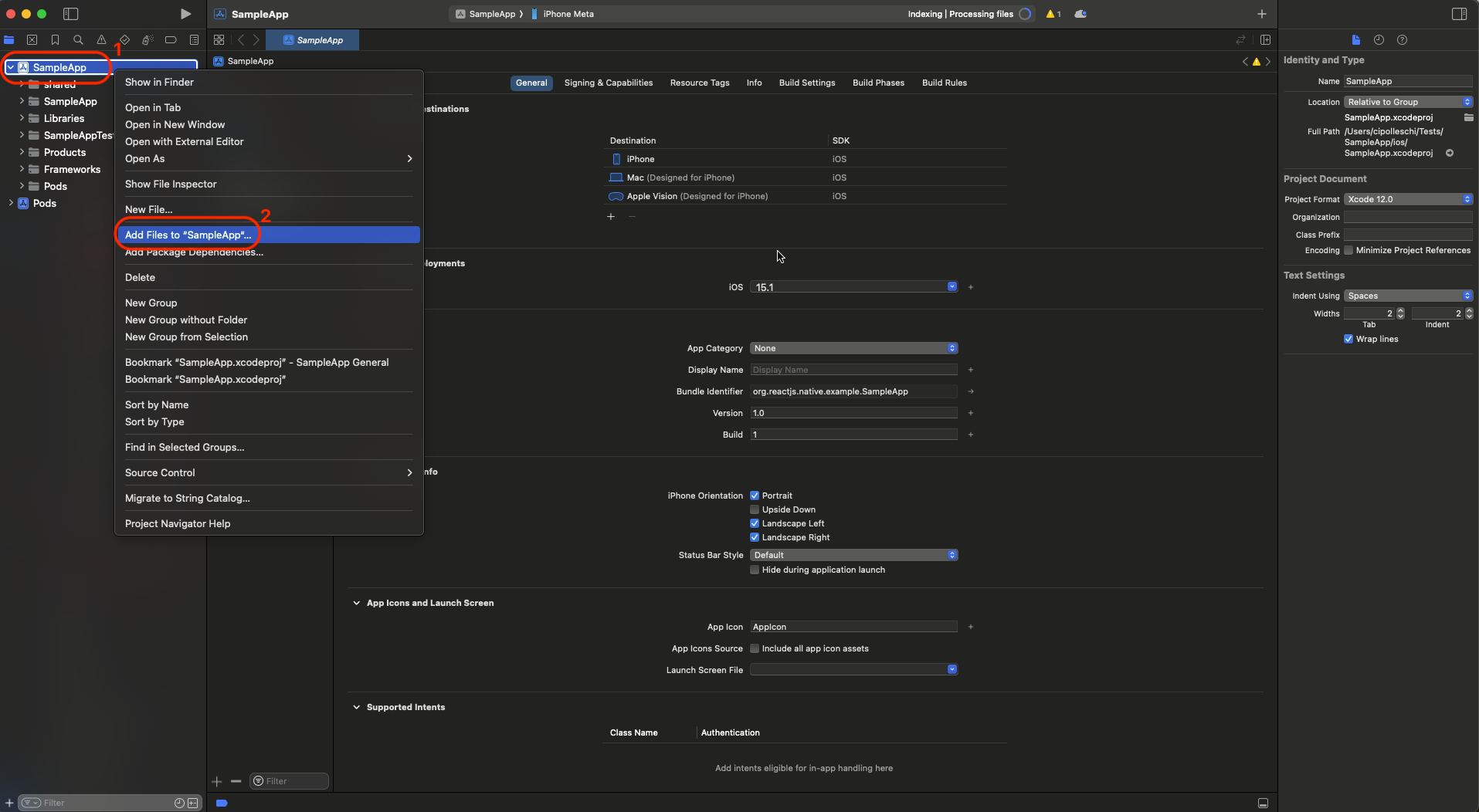
- 点击左侧的
SampleApp项目,选择Add files to "Sample App"...
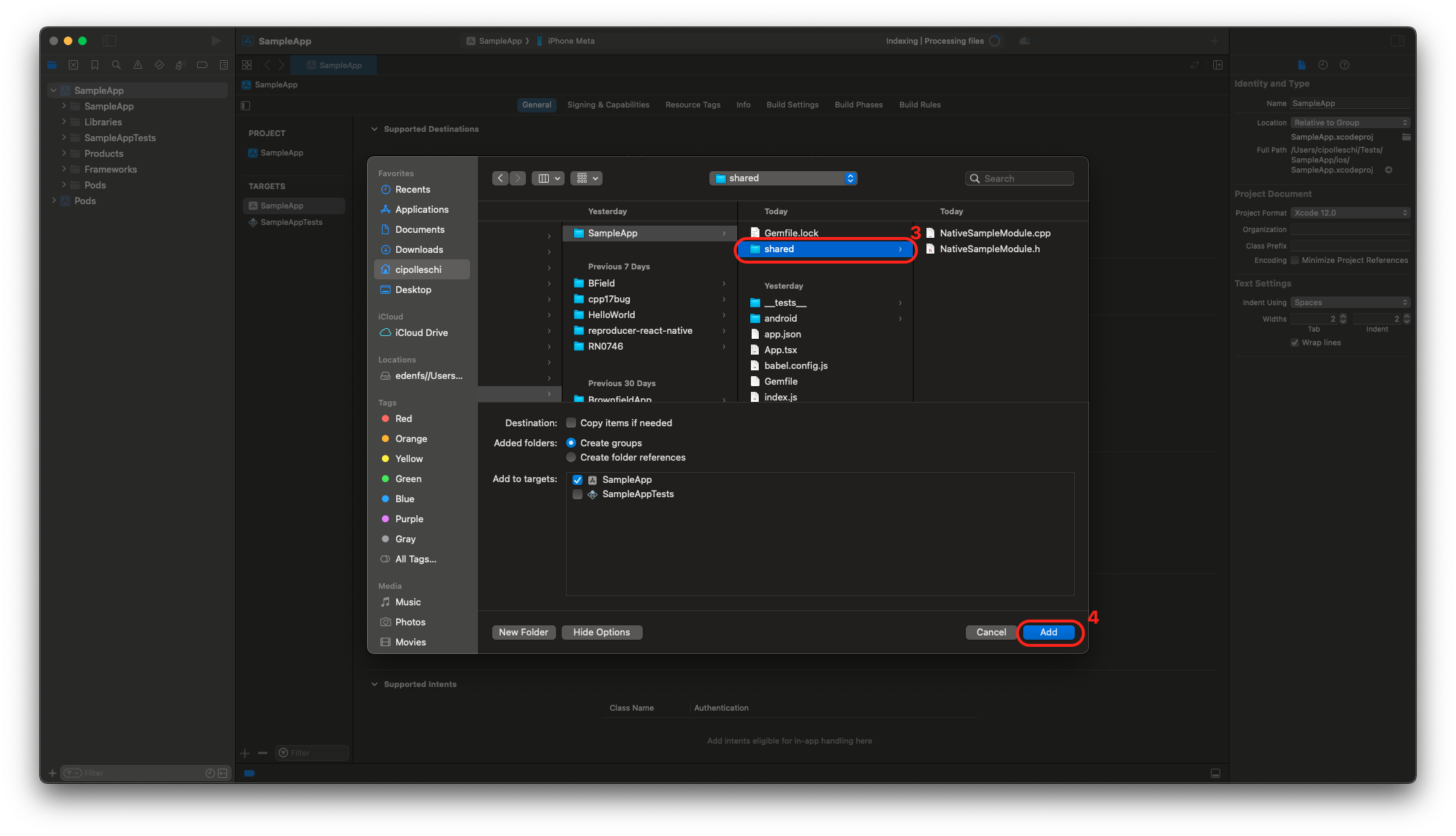
- 选择
shared文件夹后点击Add
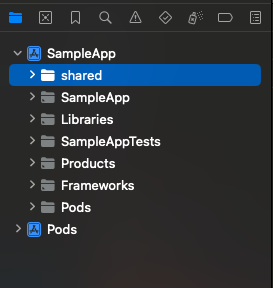
如果操作正确,左侧项目结构应如下图所示:
3. 在应用中注册 C++ Turbo Native Module
如果你的应用包含 C++ 编写的本地模块,将无法使用 React Native 0.77 提供的 Swift 版 AppDelegate。
若属于这种情况,请跳过 AppDelegate 迁移到 Swift 的步骤,继续使用 Objective-C++ 作为应用的 AppDelegate。
React Native 核心主要使用 C++ 开发以实现跨平台代码共享。Swift 与 C++ 的互操作性尚未成熟稳定,我们正在探索解决方案填补这一空白。
最后这步将告诉 iOS 应用如何查找纯 C++ Turbo Native Module。
在 Xcode 中打开 AppDelegate.mm 文件并按以下方式修改:
#import <React/RCTBundleURLProvider.h>
+ #import <RCTAppDelegate+Protected.h>
+ #import "NativeSampleModule.h"

// ...
  return [[NSBundle mainBundle] URLForResource:@"main" withExtension:@"jsbundle"];
#endif
}

+- (std::shared_ptr<facebook::react::TurboModule>)getTurboModule:(const std::string &)name
+                                                      jsInvoker:(std::shared_ptr<facebook::react::CallInvoker>)jsInvoker
+{
+  if (name == "NativeSampleModule") {
+    return std::make_shared<facebook::react::NativeSampleModule>(jsInvoker);
+  }
+
+  return [super getTurboModule:name jsInvoker:jsInvoker];
+}

@end
这些修改实现了以下功能:
-
导入
RCTAppDelegate+Protected头文件,使 AppDelegate 符合RCTTurboModuleManagerDelegate协议 -
导入纯 C++ Native Turbo Module 接口
NativeSampleModule.h -
重写 C++ 模块的
getTurboModule方法,当 JavaScript 请求NativeSampleModule时返回正确模块
现在从 Xcode 构建应用,应该能成功编译。
5. 测试代码
现在是从 JavaScript 访问 C++ Turbo Native Module 的时候了。我们需要修改 App.tsx 文件导入 Turbo Native Module 并在代码中调用。
-
打开
App.tsx文件。 -
将模板内容替换为以下代码:
import React from 'react';
import {
  Button,
  SafeAreaView,
  StyleSheet,
  Text,
  TextInput,
  View,
} from 'react-native';
import SampleTurboModule from './specs/NativeSampleModule';

function App(): React.JSX.Element {
  const [value, setValue] = React.useState('');
  const [reversedValue, setReversedValue] = React.useState('');

  const onPress = () => {
    const revString = SampleTurboModule.reverseString(value);
    setReversedValue(revString);
  };

  return (
    <SafeAreaView style={styles.container}>
      <View>
        <Text style={styles.title}>
          Welcome to C++ Turbo Native Module Example
        </Text>
        <Text>Write down here the text you want to reverse</Text>
        <TextInput
          style={styles.textInput}
          placeholder="Write your text here"
          onChangeText={setValue}
          value={value}
        />
        <Button title="Reverse" onPress={onPress} />
        <Text>Reversed text: {reversedValue}</Text>
      </View>
    </SafeAreaView>
  );
}

const styles = StyleSheet.create({
  container: {
    flex: 1,
    justifyContent: 'center',
    alignItems: 'center',
  },
  title: {
    fontSize: 18,
    marginBottom: 20,
  },
  textInput: {
    borderColor: 'black',
    borderWidth: 1,
    borderRadius: 5,
    padding: 10,
    marginTop: 10,
  },
});

export default App;
本应用中有几个关键代码行值得关注:
-
import SampleTurboModule from './specs/NativeSampleModule';:此行将 Turbo Native Module 导入应用 -
onPress回调中的const revString = SampleTurboModule.reverseString(value);:这是在应用中使用 Turbo Native Module 的方式
为简化示例并保持代码简洁,我们直接在应用中导入了规范文件。 最佳实践是创建单独的封装文件来处理规范,然后在应用中使用该文件。 这样可以在 JavaScript 中更好地准备规范输入参数并增强控制力。
恭喜!你已成功编写了首个 C++ Turbo Native Module!
 |  |