本页面由 PageTurner AI 翻译(测试版)。未经项目官方认可。 发现错误? 报告问题 →
在原生模块中触发事件
某些场景下,你可能需要原生模块监听平台层事件并将其传递到 JavaScript 层,使应用能够响应这些原生事件。另外,长时间运行的操作可能需要触发事件以便在这些事件发生时更新 UI。
这两种情况都是原生模块触发事件的典型用例。本指南将教你如何实现事件触发机制。
当存储中添加新键时触发事件
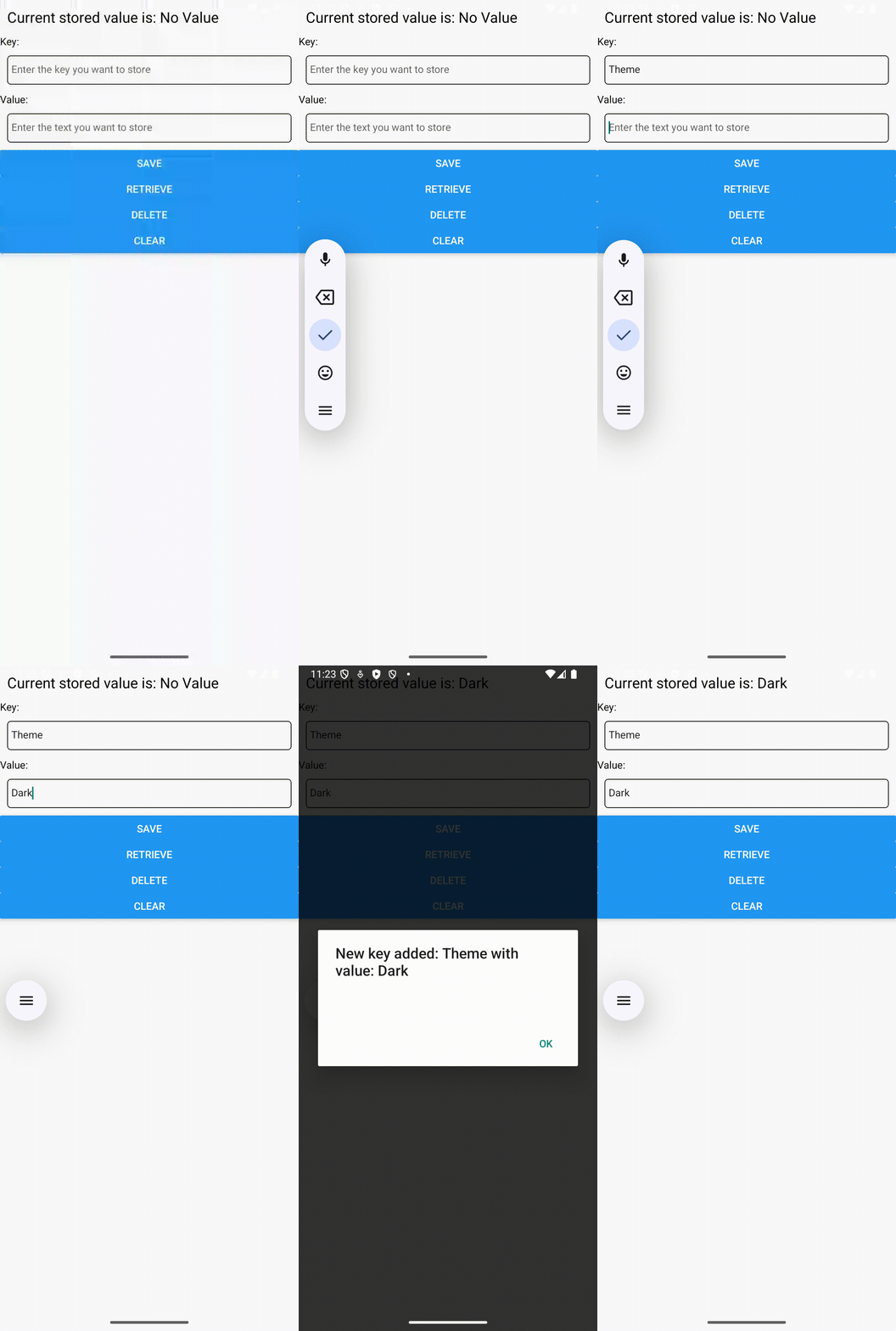
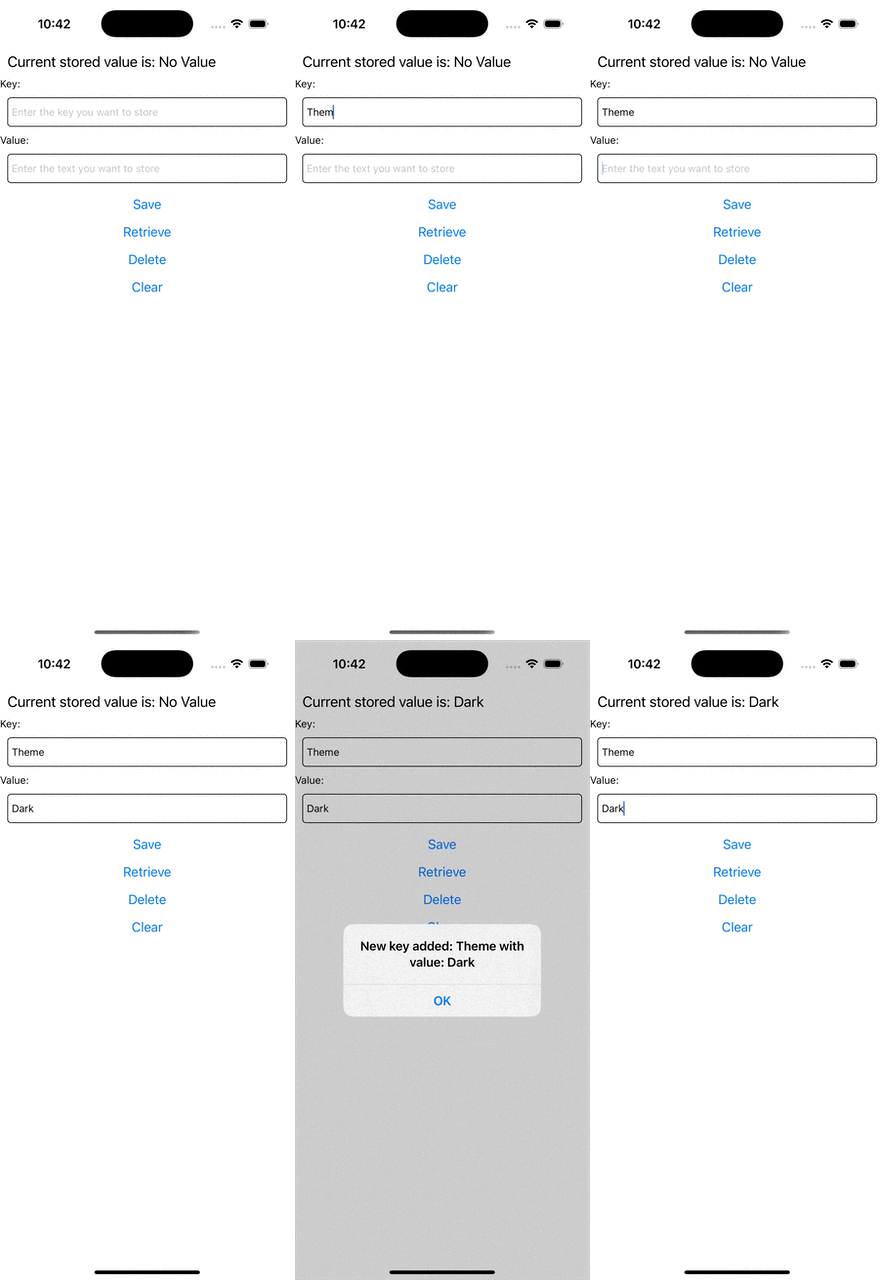
本示例将演示如何在存储中添加新键时触发事件。请注意:修改键值不会触发事件,仅当添加新键时会触发。
本指南基于原生模块文档内容展开。在继续前请确保已熟悉该指南,建议先实践其中的示例。
步骤 1:更新 NativeLocalStorage 规范
首先需要更新 NativeLocalStorage 规范,让 React Native 知晓该模块具备事件触发能力。
- TypeScript
- Flow
Open the NativeLocalStorage.ts file and update it as it follows:
+import type {TurboModule, CodegenTypes} from 'react-native';
import {TurboModuleRegistry} from 'react-native';

+export type KeyValuePair = {
+  key: string,
+  value: string,
+}

export interface Spec extends TurboModule {
  setItem(value: string, key: string): void;
  getItem(key: string): string | null;
  removeItem(key: string): void;
  clear(): void;

+ readonly onKeyAdded: CodegenTypes.EventEmitter<KeyValuePair>;
}

export default TurboModuleRegistry.getEnforcing<Spec>(
  'NativeLocalStorage',
);
Open the NativeLocalStorage.js file and update it as it follows:
// @flow
+import type {TurboModule, CodegenTypes} from 'react-native';
import {TurboModule, TurboModuleRegistry} from 'react-native';

+export type KeyValuePair = {
+  key: string,
+  value: string,
+}

export interface Spec extends TurboModule {
  setItem(value: string, key: string): void;
  getItem(key: string): ?string;
  removeItem(key: string): void;
  clear(): void;
+ onKeyAdded: CodegenTypes.EventEmitter<KeyValuePair>
}
export default (TurboModuleRegistry.get<Spec>(
  'NativeLocalStorage'
): ?Spec);
通过 import type 语句从 react-native 导入包含 EventEmitter 类型的 CodegenTypes。这允许你使用 CodegenTypes.EventEmitter<KeyValuePair> 定义 onKeyAdded 属性,明确事件将携带 KeyValuePair 类型的载荷。
事件触发时,预期会接收到类型为 KeyValuePair 的参数。
步骤 2:生成 Codegen
更新原生模块规范后,需重新运行 Codegen 在原生代码中生成工件。
此流程与原指南中的操作一致。
- Android
- iOS
Codegen is executed through the generateCodegenArtifactsFromSchema Gradle task:
cd android
./gradlew generateCodegenArtifactsFromSchema

BUILD SUCCESSFUL in 837ms
14 actionable tasks: 3 executed, 11 up-to-date
This is automatically run when you build your Android application.
Codegen is run as part of the script phases that's automatically added to the project generated by CocoaPods.
cd ios
bundle install
bundle exec pod install
The output will look like this:
...
Framework build type is static library
[Codegen] Adding script_phases to ReactCodegen.
[Codegen] Generating ./build/generated/ios/ReactCodegen.podspec.json
[Codegen] Analyzing /Users/me/src/TurboModuleExample/package.json
[Codegen] Searching for Codegen-enabled libraries in the app.
[Codegen] Found TurboModuleExample
[Codegen] Searching for Codegen-enabled libraries in the project dependencies.
[Codegen] Found react-native
...
步骤 3:更新应用代码
现在需要更新应用代码来处理新事件。
打开 App.tsx 文件并按如下方式修改:
import React from 'react';
import {
+ Alert,
+ EventSubscription,
  SafeAreaView,
  StyleSheet,
  Text,
  TextInput,
  Button,
} from 'react-native';

import NativeLocalStorage from './specs/NativeLocalStorage';

const EMPTY = '<empty>';

function App(): React.JSX.Element {
  const [value, setValue] = React.useState<string | null>(null);
+ const [key, setKey] = React.useState<string | null>(null);
+ const listenerSubscription = React.useRef<null | EventSubscription>(null);

+ React.useEffect(() => {
+   listenerSubscription.current = NativeLocalStorage?.onKeyAdded((pair) => Alert.alert(`New key added: ${pair.key} with value: ${pair.value}`));

+   return  () => {
+     listenerSubscription.current?.remove();
+     listenerSubscription.current = null;
+   }
+ }, [])

  const [editingValue, setEditingValue] = React.useState<
    string | null
  >(null);

- React.useEffect(() => {
-   const storedValue = NativeLocalStorage?.getItem('myKey');
-   setValue(storedValue ?? '');
- }, []);

  function saveValue() {
+   if (key == null) {
+     Alert.alert('Please enter a key');
+     return;
+   }
    NativeLocalStorage?.setItem(editingValue ?? EMPTY, key);
    setValue(editingValue);
  }

  function clearAll() {
    NativeLocalStorage?.clear();
    setValue('');
  }

  function deleteValue() {
+   if (key == null) {
+     Alert.alert('Please enter a key');
+     return;
+   }
    NativeLocalStorage?.removeItem(key);
    setValue('');
  }

+ function retrieveValue() {
+   if (key == null) {
+     Alert.alert('Please enter a key');
+     return;
+   }
+   const val = NativeLocalStorage?.getItem(key);
+   setValue(val);
+ }

  return (
    <SafeAreaView style={{flex: 1}}>
      <Text style={styles.text}>
        Current stored value is: {value ?? 'No Value'}
      </Text>
+     <Text>Key:</Text>
+      <TextInput
+       placeholder="Enter the key you want to store"
+       style={styles.textInput}
+       onChangeText={setKey}
+     />
+     <Text>Value:</Text>
      <TextInput
        placeholder="Enter the text you want to store"
        style={styles.textInput}
        onChangeText={setEditingValue}
      />
      <Button title="Save" onPress={saveValue} />
+     <Button title="Retrieve" onPress={retrieveValue} />
      <Button title="Delete" onPress={deleteValue} />
      <Button title="Clear" onPress={clearAll} />
    </SafeAreaView>
  );
}

const styles = StyleSheet.create({
  text: {
    margin: 10,
    fontSize: 20,
  },
  textInput: {
    margin: 10,
    height: 40,
    borderColor: 'black',
    borderWidth: 1,
    paddingLeft: 5,
    paddingRight: 5,
    borderRadius: 5,
  },
});

export default App;
需要关注以下关键改动:
-
需从
react-native导入EventSubscription类型以处理EventSubscription -
使用
useRef跟踪EventSubscription引用 -
通过
useEffect钩子注册监听器。onKeyAdded函数接收回调函数,其参数为KeyValuePair类型对象 -
添加到
onKeyAdded的回调函数会在事件从原生层传递到 JS 层时执行 -
在
useEffect清理函数中,remove事件订阅并将 ref 设为null
其余改动属于常规 React 优化,用于增强应用对新功能的支持
步骤 4:编写原生代码
准备工作完成后,开始编写原生平台代码
- Android
- iOS
Assuming you followed the guide for Android described in the Native Modules guide, what's left to do is to plug the code that emit the events in your app.
To do so, you have to:
- Open the
NativeLocalStorage.ktfile - Modify it as it follows:
package com.nativelocalstorage

import android.content.Context
import android.content.SharedPreferences
import com.nativelocalstorage.NativeLocalStorageSpec
+import com.facebook.react.bridge.Arguments
import com.facebook.react.bridge.ReactApplicationContext
+import com.facebook.react.bridge.WritableMap

class NativeLocalStorageModule(reactContext: ReactApplicationContext) : NativeLocalStorageSpec(reactContext) {

  override fun getName() = NAME

  override fun setItem(value: String, key: String) {
+   var shouldEmit = false
+   if (getItem(key) != null) {
+       shouldEmit = true
+   }
    val sharedPref = getReactApplicationContext().getSharedPreferences("my_prefs", Context.MODE_PRIVATE)
    val editor = sharedPref.edit()
    editor.putString(key, value)
    editor.apply()

+   if (shouldEmit == true) {
+       val eventData = Arguments.createMap().apply {
+           putString("key", key)
+           putString("value", value)
+       }
+       emitOnKeyAdded(eventData)
+   }
  }

  override fun getItem(key: String): String? {
    val sharedPref = getReactApplicationContext().getSharedPreferences("my_prefs", Context.MODE_PRIVATE)
    val username = sharedPref.getString(key, null)
    return username.toString()
  }
First, you need to import a couple of types that you need to use to create the eventData that needs to be sent from Native to JS. These imports are:
import com.facebook.react.bridge.Argumentsimport com.facebook.react.bridge.WritableMap
Secondly, you need to implement the logic that actually emits the event to JS. In case of complex types, like the KeyValuePair defined in the specs, Codegen will generate a function that expects a ReadableMap as a parameter. You can create the ReadableMap by using the Arguments.createMap() factory method, and use the apply function to populate the map. It's your responsibility to make sure that the the keys you are using in the map are the same properties that are defined in the spec type in JS.
Assuming you followed the guide for iOS described in the Native Modules guide, what's left to do is to plug the code that emit the events in your app.
To do so, you have to:
- Open the
RCTNativeLocalStorage.hfile. - Change the base class from
NSObjecttoNativeLocalStorageSpecBase
#import <Foundation/Foundation.h>
#import <NativeLocalStorageSpec/NativeLocalStorageSpec.h>

NS_ASSUME_NONNULL_BEGIN

-@interface RCTNativeLocalStorage : NSObject <NativeLocalStorageSpec>
+@interface RCTNativeLocalStorage : NativeLocalStorageSpecBase <NativeLocalStorageSpec>

@end

NS_ASSUME_NONNULL_END
- Open the
RCTNativeLocalStorage.mmfile. - Modify it to emit the events when needed, for example:
 - (void)setItem:(NSString *)value key:(NSString *)key {
+  BOOL shouldEmitEvent = NO;
+  if (![self getItem:key]) {
+    shouldEmitEvent = YES;
+  }
   [self.localStorage setObject:value forKey:key];

+  if (shouldEmitEvent) {
+    [self emitOnKeyAdded:@{@"key": key, @"value": value}];
+  }
}
The NativeLocalStorageSpecBase is a base class that provides the emitOnKeyAdded method and its basic implementation and boilerplate. Thanks to this class, you don't have to handle all the conversion between Objective-C and JSI that is required to send the event to JS.
In case of complex types, like the KeyValuePair defined in the specs, Codegen will generate a generic dictionary that you can populate on the native side. It's your responsibility to make sure that the the keys you are using in the dictionary are the same properties that are defined in the spec type in JS.
步骤 5:运行应用
现在尝试运行应用,应能看到预期行为
 |  |